|
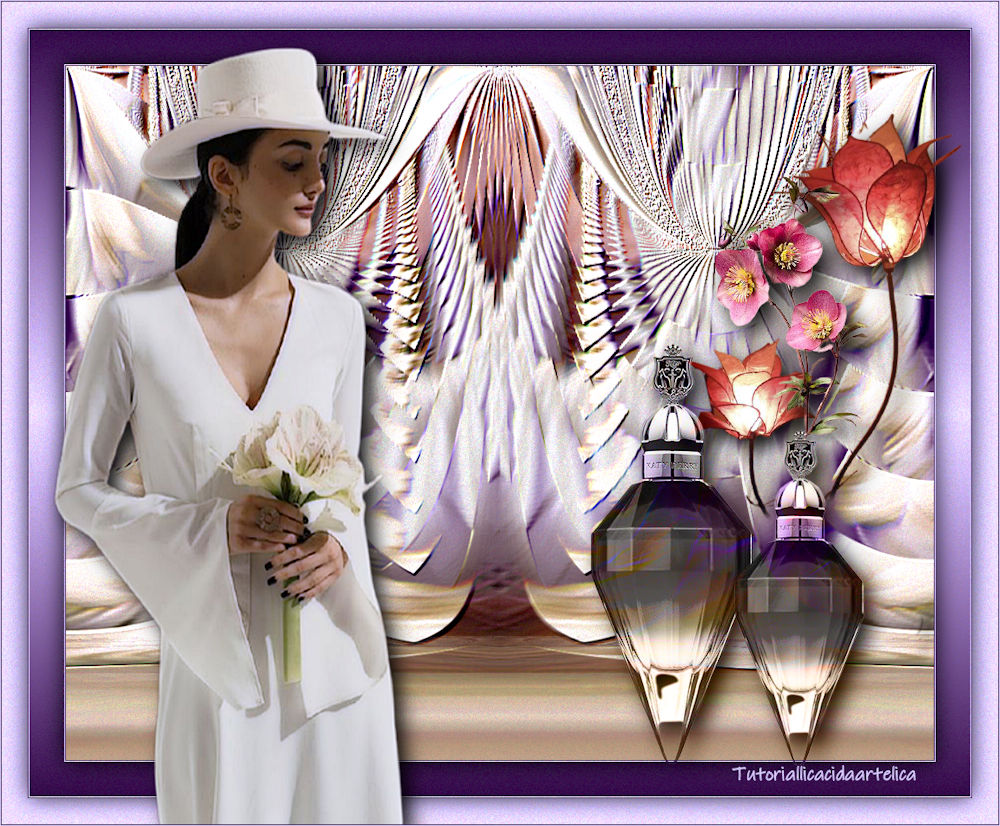
Adorable
TRADUÇÕES

MATERIAL

Tube: Callitubes-1311mulheres
Deco: Callitubes-153flores
Callitube-96diversos
Callitubes-36diversos
Marca-d'água.
Efeitos do PSP.
Versão usada: PSP X9.
PLUGINS
Plugin MuRa's Meister → Perspective Tiling
Plugin AAA Filters → Custom
Plugin Alien Skin Eye Candy 5: Impact → Perspective Shadow
TUTORIAL
|
Esta seta marca sua linha
Clique e arraste para movê-la
|
|
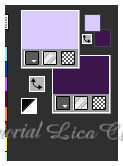
Configure: Foreground: #d9cafe — Background: #3c174e.
1_.
Abra uma nova imagem transparente de 1000 x 700 px.
Pinte com a cor do Background: #3c174e.
2_.
Selections → Select All.
Edit → Copy no tube Callitubes-1311mulheres
Edit → Paste Into Selection.
Selections → Select None.
3_.
Effects → Image Effects → Seamless Tiling — Default — Transition (%): 100.
4_.
Adjust → Blur → Motion Blur — Angle: 250 — Strength: 100 (aplique duas vezes).
5_.
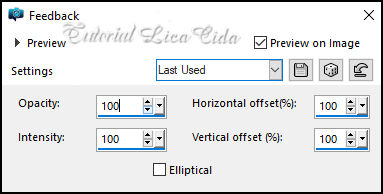
Effects → Reflection Effects → Feedback.
6_.
Effects → Geometric Effects → Circle — Wrap.
7_.
Layers → Duplicate.
Image → Mirror → Mirror Horizontal.
Blend Mode: Lighten.
Layers → Merge → Merge Visible.
8_.
Effects → Distortion Effects → Polar Coordinates — Polar to rectangular.
Image → Mirror → Mirror Vertical.
9_.
Adjust → Brightness and Contrast → Brightness/Contrast: 10 / 20.
Effects → User Defined Filter → Emboss_6.
10_.
Image → Canvas Size: 1000 x 800 — Bottom: 100.
Layers → Duplicate.
11_.
Plugin MuRa's Meister → Perspective Tiling.
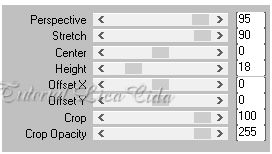
Effects → User Defined Filter → Emboss_3.
12_.
Effects → Reflection Effects → Rotating Mirror: 0 / 0 — Reflect.
Com a ferramenta Magic Wand — Feather: 60, clique na parte transparente e pressione Delete (duas ou três vezes, para suavizar o efeito).
Selections → Select None.
BORDAS
Image → Add Borders: 1 px, Symmetric marcado — cor do Background.
Image → Add Borders: 1 px, Symmetric marcado — cor do Foreground.
Selections → Select All.
Image → Add Borders: 40 px, Symmetric marcado — Color: #ffffff.
Selections → Invert.
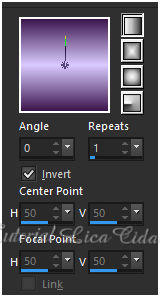
Pinte com o gradiente Linear.
Effects → 3D Effects → Drop Shadow: 0 / 0 / 80 / 40,00 — Color: #000000.
Selections → Select None.
Image → Add Borders: 1 px, Symmetric marcado — cor do Foreground.
Image → Add Borders: 1 px, Symmetric marcado — cor do Background.
Selections → Select All.
Image → Add Borders: 30 px, Symmetric marcado — cor do Foreground.
Effects → 3D Effects → Drop Shadow: 0 / 0 / 80 / 40,00 — Color: #000000.
Selections → Select None.
13_.
Plugin AAA Filters → Custom — Grain (Default).
14_.
Edit → Copy no tube Callitubes-1311mulheres
Edit → Paste As New Layer.
Posicione.
Plugin Alien Skin Eye Candy 5: Impact → Perspective Shadow — Blurry.
15_.
Edit → Copy nos decos Callitube-96diversos, Callitubes-36diversos e Callitubes-153flores
Edit → Paste As New Layer (um de cada vez).
Posicione como no modelo ou a gosto.
Plugin Alien Skin Eye Candy 5: Impact → Perspective Shadow — Blurry.
Image → Add Borders: 1 px, Symmetric marcado — cor do Background.
Image → Add Borders: 1 px, Symmetric marcado — cor do Foreground.
Image → Resize: Width 1000 px.
Aplique a marca-d'água.
Assine e salve.
Espero que gostem.
Obrigada!
Aparecida / LicaCida, outubro de 2021.
Rio de Janeiro - Brasil.

VOLTAR
Copyright ©2026 - Web Design - Naise Minas
|
