|
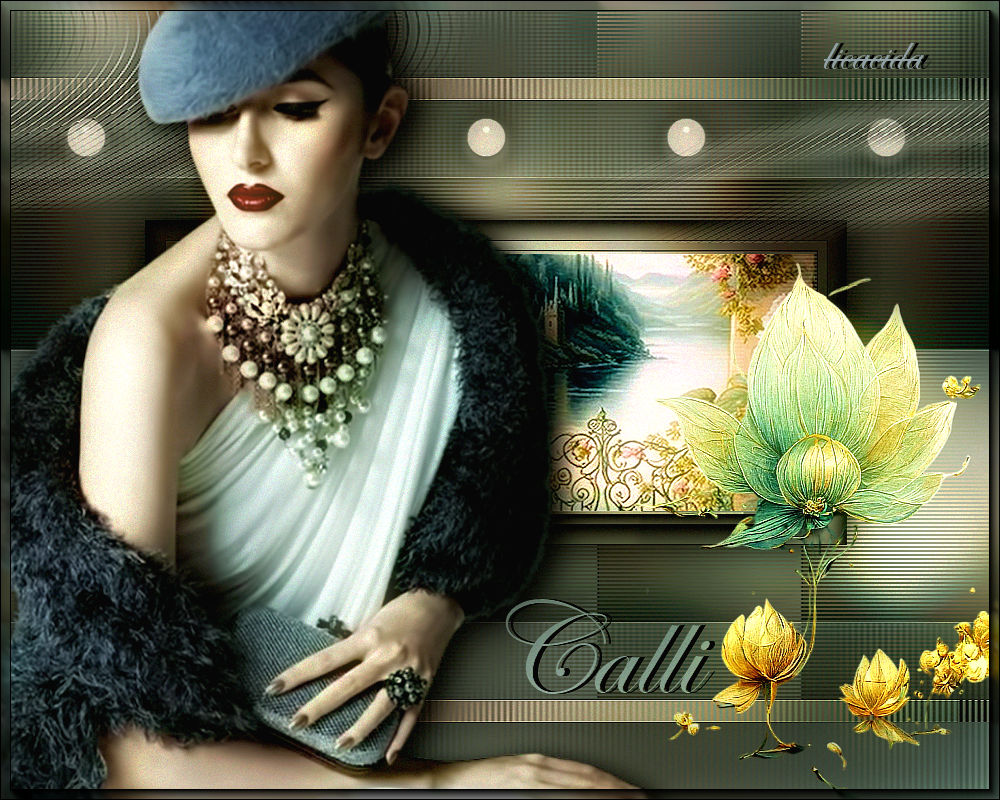
Calli
DEDICATÓRIA
Fernanda Calligraphy
Carinhosamente.
TRADUÇÕES

MATERIAL

Alpha: AlphaCalli
Tubes: Callitubes-3123mulheres
Callitubes-583paisagens (1)
Callitubes-317flores
Decor: decorarquivonet
bolinha brancalc
Título: TituloCallybylc
Marca-d'água.
Efeitos do PSP.
PLUGINS
Plugin Mehdi → Sorting Tiles
Plugin Convolution Filters → Emboss (light)
Plugin Distortion Filters → Scanline Shifter
Plugin Toadies → What Are You?
Plugin MuRa's Meister → Copies
Plugin AAA Filters → Custom → Landscape
Plugin AAA Frames → Foto Frame
Plugin Nik Software → Color Efex Pro 3.0 → Glamour Glow
TUTORIAL

|
Esta seta marca sua linha
Clique e arraste para movê-la
|
|
1_.
Abra o material no PSP, duplique e feche o original.
Escolha duas cores para trabalhar: Foreground: #444444 — Background: #92a1a5.
2_.
Abra o arquivo AlphaCalli.
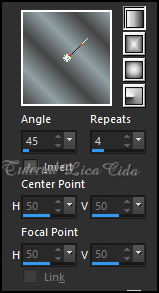
Pinte com o gradiente formado pelas cores em uso.
Configure: Style: Linear — Angle: 45 — Repeats: 4.
3_.
Edit → Copy no tube Callitubes-583paisagens (1)
Edit → Paste As New Layer.
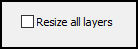
Image → Resize: 80% — Resize all layers desmarcado.
4_.
Effects → Image Effects → Seamless Tiling — Default.
5_.
Adjust → Blur → Gaussian Blur — Radius: 24,00.
Layers → Merge → Merge Down.
6_.
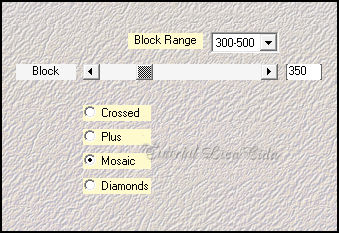
Plugin Mehdi → Sorting Tiles.
7_.
Effects → Reflection Effects → Rotating Mirror — Default.
8_.
Plugin Convolution Filters → Emboss (light): 191.
9_.
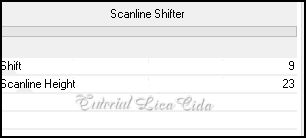
Plugin Distortion Filters → Scanline Shifter (aplique três vezes).
10_.
Selections → Load/Save Selection → Load Selection From Alpha Channel → Selection #1.
Selections → Promote Selection to Layer.
Selections → Select None.
11_.
Plugin Toadies → What Are You?: 20 / 20.
Effects → Edge Effects → Enhance.
12_.
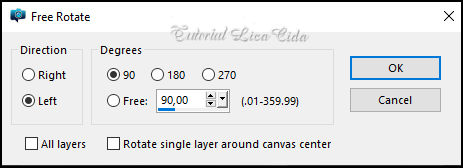
Image → Free Rotate.
13_.
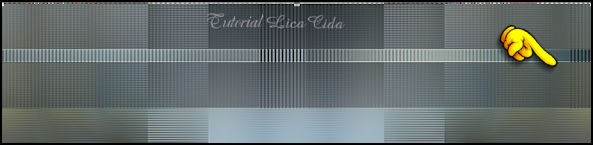
Objects → Align → Top.
Com a ferramenta Pick Tool, leve o efeito até o final do back. Veja o modelo:
Effects → 3D Effects → Drop Shadow: 0 / 0 / 100 / 60,00 — Color: #000000.
Aplique o Drop Shadow como desejar.
14_.
Ative a layer Merged.
Selections → Load/Save Selection → Load Selection From Alpha Channel → Selection #2.
Selections → Invert.
15_.
Plugin Distortion Filters → Scanline Shifter (aplique três vezes), como no print do item 9.
Selections → Invert.
Effects → 3D Effects → Drop Shadow: 0 / 0 / 100 / 60,00 — Color: #000000.
Aplique o Drop Shadow como desejar.
Ainda selecionado:
16_.
Plugin AAA Frames → Foto Frame: Width: 30 — demais valores Default.
17_.
Plugin AAA Frames → Foto Frame: Width: 20 — demais valores Default.
18_.
Effects → Reflection Effects → Rotating Mirror: 0 / 180.
19_.
Edit → Copy no tube Callitubes-583paisagens (1)
Edit → Paste As New Layer.
Image → Resize: 80% — Resize all layers desmarcado.
Selections → Invert.
Aperte a tecla Delete.
OBSERVAÇÃO
Procure o melhor posicionamento da paisagem para usar o seu tube.
20_.
Com a ferramenta Selection Tool, selecione onde está a marca do Plugin AAA Frames → Foto Frame (Width: 20), como indico:
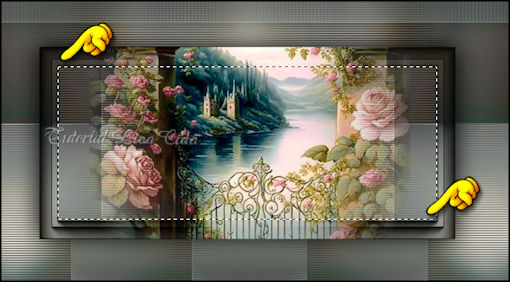
Selections → Invert.
Aperte a tecla Delete.
Selections → Select None.
Adjust → Sharpness → Sharpen.
21_.
Image → Canvas Size: 1000 x 800 — Bottom: 100.
22_.
Layers → New Raster Layer.
Layers → Arrange → Send to Bottom.
23_.
Pinte com o gradiente Linear formado no item 2.
24_.
Adjust → Blur → Gaussian Blur — Radius: 24,00.
25_.
Ative a layer do topo.
Layers → Duplicate.
Image → Flip.
Layers → Merge → Merge Down.
LAYERS
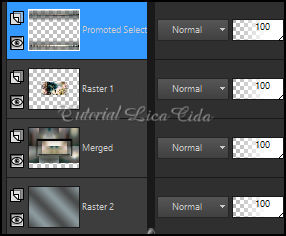
26_.
Edit → Copy no decorarquivonet
Edit → Paste As New Layer.
Posicione com a ajuda da ferramenta Pick Tool.
Adjust → Sharpness → Sharpen.
27_.
Edit → Copy na bolinha brancalc
Edit → Paste As New Layer.
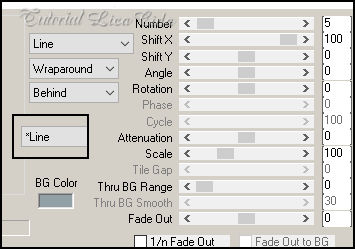
Plugin MuRa's Meister → Copies — Line.
Posicione como no modelo. Aplique o Drop Shadow como desejar.
28_.
Edit → Copy no tube Callitubes-317flores
Edit → Paste As New Layer.
Posicione. Aplique o Drop Shadow como desejar.
29_.
Edit → Copy no tube Callitubes-3123mulheres
Edit → Paste As New Layer.
Posicione. Aplique o Drop Shadow como desejar.
Adjust → Sharpness → Sharpen.
30_.
Edit → Copy no TituloCallybylc
Edit → Paste As New Layer.
Posicione a gosto.
Layers → Merge → Merge All (Flatten).
31_.
Plugin AAA Frames → Foto Frame: Width: 10 — demais valores Default.
32_.
Plugin AAA Filters → Custom → Landscape, Grain — Default.
33_.
Plugin Nik Software → Color Efex Pro 3.0 → Glamour Glow.
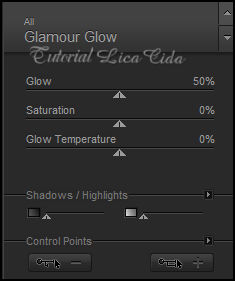
Aplique a marca-d'água.
Assine e salve.
File → Export → JPEG Optimizer.
Aparecida / LicaCida, agosto de 2023.
Rio de Janeiro - Brasil.

VOLTAR
Copyright ©2026 - Web Design - Naise Minas
|


