|
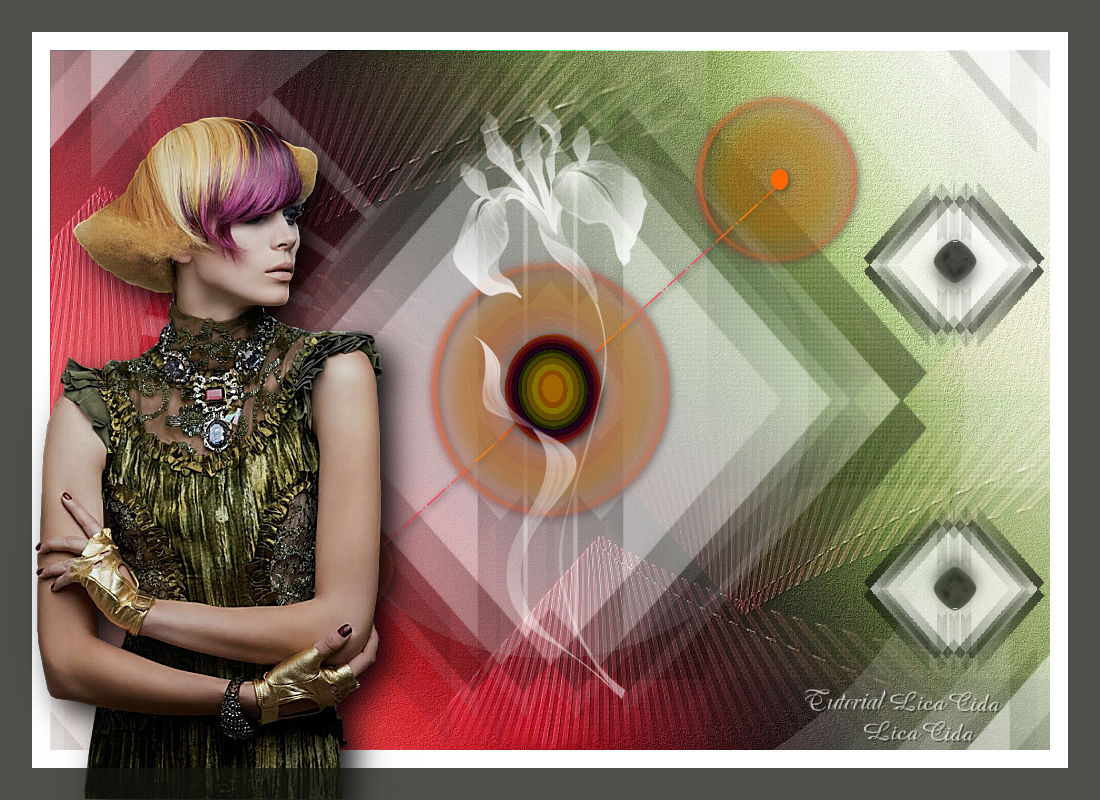
Colorful Trend
TRADUÇÕES

MATERIAL

Back: Ildiko_Design@Backgrounds 23
Masks: Ildiko_Desings_Created@Mask_1
ildiko_create_0002free_mask_2
Tube: Ildiko_Design@ Women_Tube% (2)
Deco: decomask
DECOS_NAISEM_CRIAÇOES_OO45
Ildiko_Desings_Created@Deco_xx
Irises_by_Lileya_2 -
Marca-d'água.
Efeitos do PSP.
Versão usada: PSP X8.
PLUGINS
Plugin FM Tile Tools → Blend Emboss
Plugin Graphics Plus → Vertical Mirror
Plugin FFG → B
Plugin Nik Software → Color Efex Pro 3.0 → Bi-Color Filters
Plugin Richard Rosenman → Solid Border
TUTORIAL
|
Esta seta marca sua linha
Clique e arraste para movê-la
|
|
1_.
Abra uma nova imagem transparente de 1000 x 700 px.
Selections → Select All.
Edit → Copy no Ildiko_Design@Backgrounds 23
Edit → Paste Into Selection.
Selections → Select None.
Adjust → Add/Remove Noise → JPEG Artifact Removal: Maximum — Crispness: 79.
Plugin FM Tile Tools → Blend Emboss.
2_.
Layers → New Raster Layer.
Pinte com a cor #ffffff.
Layers → New Mask Layer → From Image: Ildiko_Desings_Created@Mask_1.
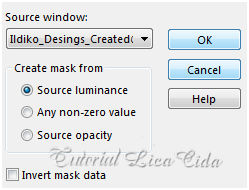
Layers → Merge → Merge Group.
Effects → 3D Effects → Drop Shadow: -27 / -27 / 100 / 0 — Color: #12140d (cor escura, retirada do back).
3_.
Effects → Image Effects → Seamless Tiling.
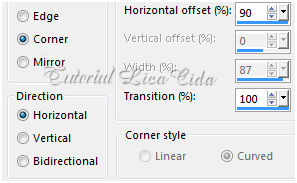
Effects → Reflection Effects → Rotating Mirror: Horizontal offset: 0 — Rotation angle: 180 — Repeat.
4_.
Plugin Graphics Plus → Vertical Mirror — Default (128 / 0).
5_.
Layers → New Raster Layer.
Pinte com a cor #ffffff.
Layers → New Mask Layer → From Image: ildiko_create_0002free_mask_2.
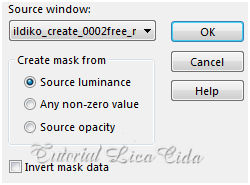
Layers → Merge → Merge Group.
6_.
Plugin FFG → B.
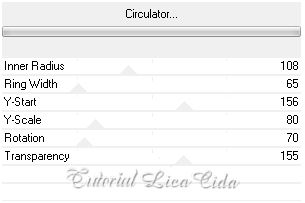
Layers → Arrange → Move Down.
Opacity: 24%.
7_.
Ative a layer superior (Group-Raster 2).
Edit → Copy no decomask
Edit → Paste As New Layer.
Posicione a gosto.
Layers → Duplicate.
Image → Mirror → Mirror Vertical.
Layers → Merge → Merge Down.
8_.
Edit → Copy no DECOS_NAISEM_CRIAÇOES_OO45
Edit → Paste As New Layer.
Centralize no efeito da mask.
9_.
Duplique a Raster 1.
Plugin Nik Software → Color Efex Pro 3.0 → Bi-Color Filters — Color Set: Violet/Pink 2.
LAYERS
Altere os Blend Modes e a Opacity das layers.
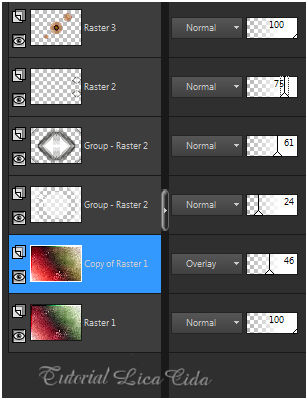
10_.
Edit → Copy no Ildiko_Desings_Created@Deco_xx
Edit → Paste As New Layer.
Posicione.
Layers → Duplicate.
Image → Mirror → Mirror Vertical (acerte a posição).
Layers → Merge → Merge Down.
Blend Mode: Luminance (L).
11_.
Edit → Copy no Irises_by_Lileya_2 -
Edit → Paste As New Layer.
Image → Negative Image.
12_.
Image → Add Borders: 50 px, Symmetric marcado — Color: #ffffff.
13_.
Edit → Copy no tube Ildiko_Design@ Women_Tube% (2)
Edit → Paste As New Layer.
Posicione.
Adjust → Sharpness → Sharpen More.
Layers → Merge → Merge All (Flatten).
14_.
Plugin Richard Rosenman → Solid Border.
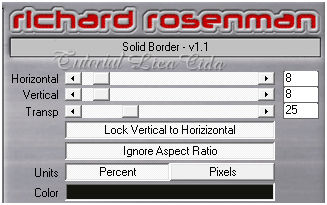
Aplique a marca-d'água.
Assine e salve.
Espero que gostem.
Aparecida / LicaCida, janeiro de 2017.
Rio de Janeiro - Brasil.

VOLTAR
Copyright ©2026 - Web Design - Naise Minas
|

