|
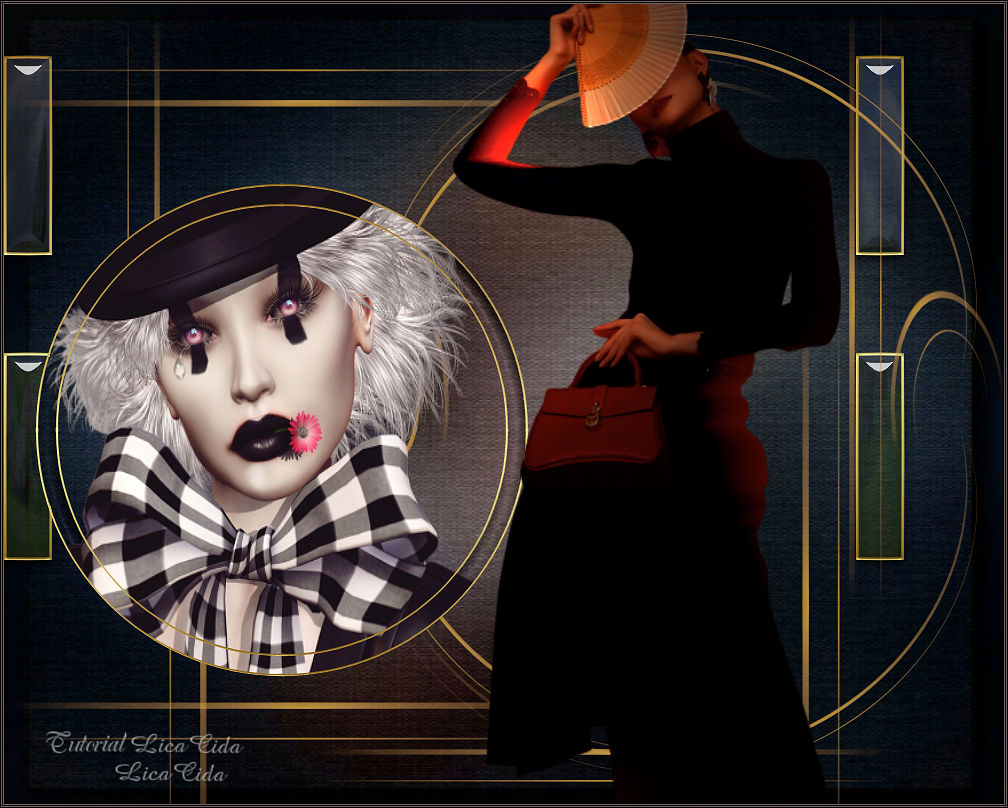
Commedia dell'Arte
TRADUÇÕES

MATERIAL

Seleções: circulolc1
Narah_sel_Listen1
Narah_sel_Listen2 --
Salvar na pasta Selections do PSP.
(Use as seleções Narah somente com a devida autorização.)
Preset: harmony (mp), do Eye Candy 5: Impact → Glass --
Dê um duplo clique no preset para importá-lo ao plugin.
Preset: Illumination → Lights → Preset_Lights_Lens_of_love --
Salvar na pasta Presets do PSP.
Tubes: Renee_TUBES_Fev. 12
Renee_TUBES_Fev. 1
Back: back (fundo do tube Renee_TUBES_Fev. 12)
Gradiente: GOLDGRADIENT
Deco: retangulo goldlc
Textura: Corel_15_014
Marca-d'água.
Efeitos do PSP.
Versão usada: PSP X8.
PLUGINS
Plugin Alien Skin Eye Candy 5: Impact → Glass
Plugin MuRa's Meister → Pole Transform
Plugin Mehdi → Weaver
Plugin Flaming Pear → Flexify 2
TUTORIAL
|
Esta seta marca sua linha
Clique e arraste para movê-la
|
|
1_.
Abra uma nova imagem transparente de 1000 x 800 px.
Selections → Select All.
Edit → Copy no back (fundo do tube Renee_TUBES_Fev. 12)
Edit → Paste Into Selection.
Selections → Select None.
Caso queira outra cor, use Adjust → Hue and Saturation → Colorize, ou prepare seu back. Use a gosto.
2_.
Layers → New Raster Layer.
Selections → Load/Save Selection → Load Selection From Disk → circulolc1.
3_.
Edit → Copy no Renee_TUBES_Fev. 1
Edit → Paste Into Selection.
Adjust → Sharpness → Sharpen.
4_.
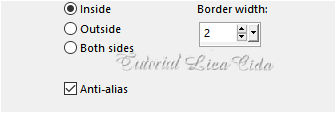
Selections → Modify → Select Selection Borders.
5_.
Layers → New Raster Layer.
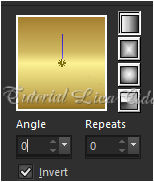
Pinte com o gradiente GOLDGRADIENT.
Configure: Style: Linear — Angle: 0 — Repeats: 0 — Invert marcado.
6_.
Effects → 3D Effects → Inner Bevel.
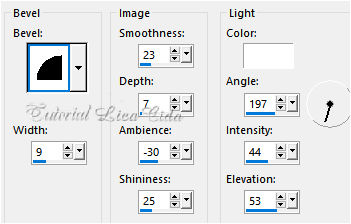
Selections → Select None.
7_.
Repita:
Selections → Load/Save Selection → Load Selection From Disk → circulolc1.
8_.
Selections → Modify → Contract: 20 px.
Selections → Modify → Select Selection Borders (print do item 4).
Layers → New Raster Layer.
Pinte com o gradiente GOLDGRADIENT (print do item 5).
Effects → 3D Effects → Inner Bevel (print do item 6).
Selections → Select None.
Layers → Merge → Merge Down.
9_.
Com a ferramenta Magic Wand (Default), selecione como no print.
Ative a Raster 1.
Selections → Promote Selection to Layer.
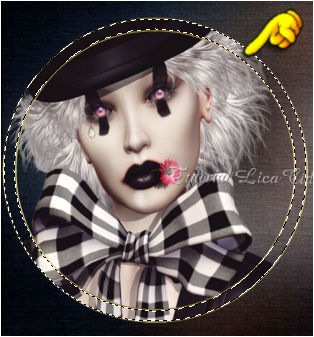
10_.
Effects → Texture Effects → Texture: Corel_15_014.
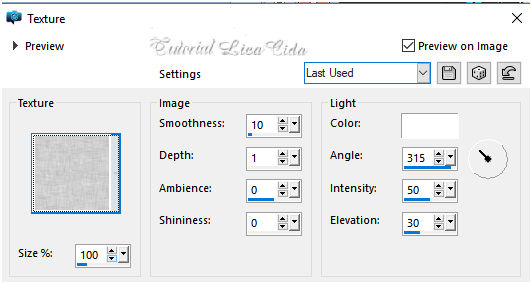
Repita: Effects → 3D Effects → Inner Bevel (print do item 6).
Selections → Select None.
LAYERS
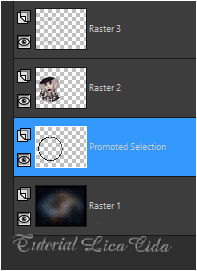
Ative a Raster 3.
Layers → Merge → Merge Down (aplique duas vezes).
LAYERS
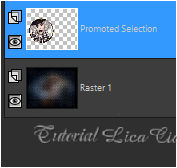
11_.
Selections → Load/Save Selection → Load Selection From Disk → Narah_sel_Listen1.
Volte para a Raster 1.
Selections → Promote Selection to Layer.
12_.
Plugin Alien Skin Eye Candy 5: Impact → Glass — Settings: User Settings → harmony.
Repita:
Selections → Modify → Select Selection Borders (print do item 4).
Layers → New Raster Layer.
Pinte com o gradiente GOLDGRADIENT (print do item 5).
Effects → 3D Effects → Inner Bevel (print do item 6).
Selections → Select None.
Layers → Merge → Merge Down.
13_.
Edit → Copy no retangulo goldlc
Edit → Paste As New Layer.
14_.
Effects → Image Effects → Offset.
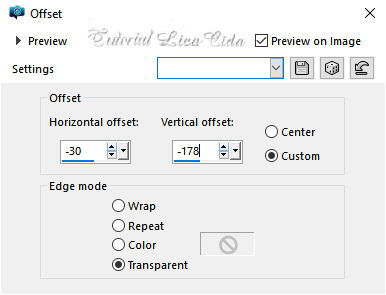
15_.
Selections → Load/Save Selection → Load Selection From Disk → Narah_sel_Listen2.
Pressione a tecla Delete.
Selections → Select None.
16_.
Plugin MuRa's Meister → Pole Transform.
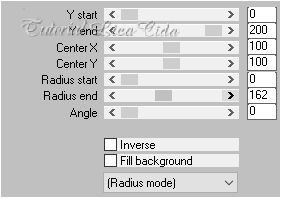
17_.
Plugin Mehdi → Weaver.
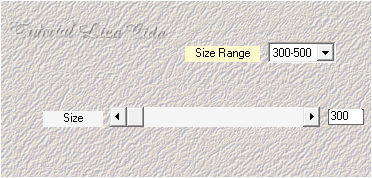
(Dupliquei a layer e usei Merge Down.)
Layers → Duplicate.
Image → Mirror → Mirror Vertical.
18_.
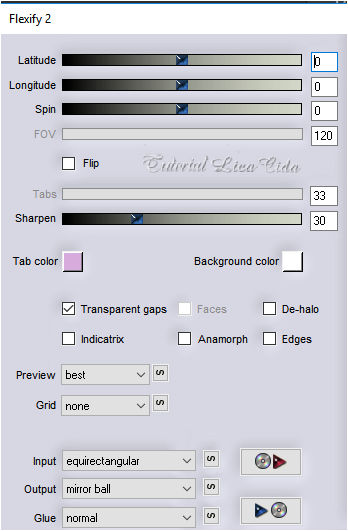
Plugin Flaming Pear → Flexify 2.
19_.
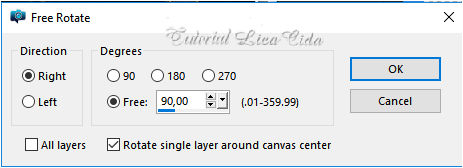
Image → Free Rotate.
Objects → Align → Right.
20_.
Edit → Copy no Renee_TUBES_Fev. 12
Edit → Paste As New Layer.
Layers → Arrange → Bring to Top.
Posicione como no modelo.
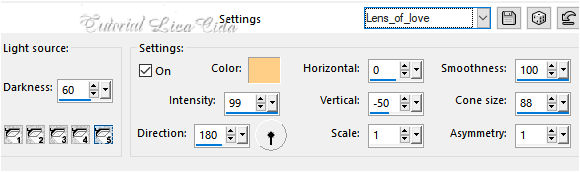
Opcional (uso no tube): Effects → Illumination Effects → Lights → Preset_Lights_Lens_of_love.
LAYERS
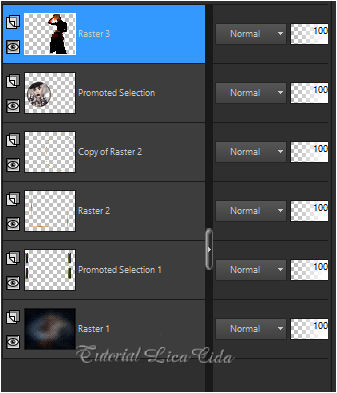
Altere os Blend Modes e a Opacity das layers (use a gosto).
21_.
Retire duas cores do back.
Image → Add Borders: 1 px, Symmetric marcado — Color: #645a58.
Image → Add Borders: 1 px, Symmetric marcado — Color: #010305.
Image → Add Borders: 1 px, Symmetric marcado — Color: #645a58.
Image → Add Borders: 1 px, Symmetric marcado — Color: #010305.
Aplique a marca-d'água.
Assine e salve.
Espero que gostem.
Aparecida / LicaCida, fevereiro de 2020.
Rio de Janeiro - Brasil.

VOLTAR
Copyright ©2026 - Web Design - Naise Minas
|


