|

I Break Tradition
TRADUÇÕES

MATERIAL

Presets: Illumination → Lights → Preset_Lights_curves (mp) e Preset_Lights_2bllc (lica) --
Salvar na pasta Presets do PSP.
Tubes: MR_Queen of Mushrooms
MR_Red Geraniums
Gabry -mist 135
Mask: Narah_Mask_1147
Decos: ildiko_create_Backgrounds (3)
@ildiko_create_deco_free_007
seta (arquivo da net)
Texto: i break tradition (arquivo da net)
Marca-d'água.
Efeitos do PSP.
Versão usada: PSP X8.
PLUGINS
Plugin Simple → Pizza Slice Mirror
Plugin VM Instant Art → Tripolis
Plugin FanHause → Tremors
Plugin Nik Software → Color Efex Pro 3.0 → Bi-Color User Defined
Plugin AAA Filters → Custom (opcional)
TUTORIAL

|
Esta seta marca sua linha
Clique e arraste para movê-la
|
|
1_.
Abra uma nova imagem transparente de 950 x 650 px.
Pinte com o gradiente formado pelas cores #48223b e #d3c4c7.
Configure: Style: Linear — Angle: 228 — Repeats: 0 — Invert desmarcado.

Plugin Simple → Pizza Slice Mirror.
Effects → Reflection Effects → Rotating Mirror: H: 0 / R: 0 — Repeat.
Plugin VM Instant Art → Tripolis — Default.
Plugin FanHause → Tremors — Default.
Effects → User Defined Filter → Emboss_3.
2_.
Layers → New Raster Layer.
Selections → Select All.
Edit → Copy no ildiko_create_Backgrounds (3)
Edit → Paste Into Selection.
Selections → Select None.
Blend Mode: Overlay.
3_.
Layers → New Raster Layer.
Pinte com a cor #ffffff.
Layers → New Mask Layer → From Image: Narah_Mask_1147.

Effects → User Defined Filter → Emboss_3.
Layers → Merge → Merge Group.
Effects → 3D Effects → Cutout — Colors: #000000 e #ffffff.

4_.
Layers → New Raster Layer.
Selections → Select All.
Edit → Copy no Gabry -mist 135
Edit → Paste Into Selection.
Selections → Select None.
Effects → Illumination Effects → Lights → Preset_Lights_curves.
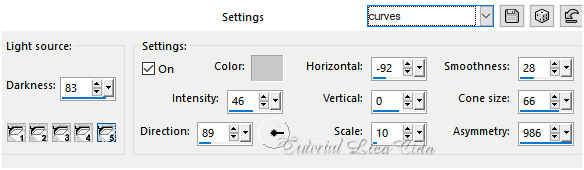
Effects → Illumination Effects → Lights → Preset_Lights_2bllc.
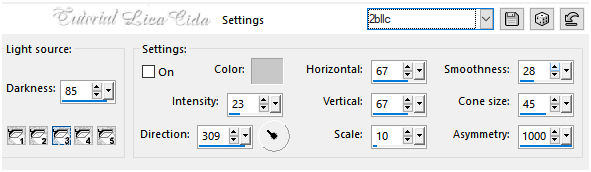
Blend Mode: Soft Light.
Adjust → Sharpness → Sharpen More.
5_.
Ative a Raster 2.
Plugin Nik Software → Color Efex Pro 3.0 → Bi-Color User Defined.

6_.
Edit → Copy no @ildiko_create_deco_free_007
Edit → Paste As New Layer.
Effects → Image Effects → Offset: H: -408 / V: -150 — Custom e Transparent marcados.
Layers → Arrange → Bring to Top.
Blend Mode: Dissolve — Opacity: 61%.
Adjust → One Step Photo Fix.
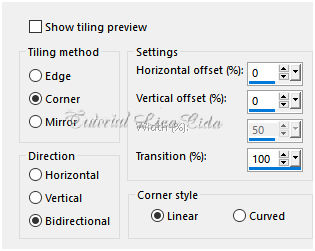
Effects → Image Effects → Seamless Tiling.
Effects → Illumination Effects → Lights → Preset_Lights_2bllc (print acima).
Altere os Blend Modes e a Opacity das layers.

7_.
Edit → Copy no tube MR_Queen of Mushrooms
Edit → Paste As New Layer.
Image → Resize: 90% — Resize all layers desmarcado.
Posicione.
8_.
Edit → Copy no tube MR_Red Geraniums
Edit → Paste As New Layer.
Image → Resize: 80% — Resize all layers desmarcado (três vezes).
Posicione.
Effects → Photo Effects → Time Machine — Early Color.

9_.
Edit → Copy no texto "i break tradition"
Edit → Paste As New Layer.
Posicione.
10_.
Edit → Copy na seta (arquivo da net)
Edit → Paste As New Layer.
Posicione.
11_.
Image → Add Borders: 1 px, Symmetric marcado — Color: cor do Foreground.
Acrescente bordas a gosto.
Opcional: Plugin AAA Filters → Custom — Landscape.
Aplique a marca-d'água.
Assine e salve.
Espero que gostem.
Aparecida / LicaCida, outubro de 2017.
Rio de Janeiro - Brasil.

VOLTAR
Copyright ©2026 - Web Design - Naise Minas
|

