|

I Will Always Love You
DEDICATÓRIA
Dedico à querida amiga Adília, com carinho!
TRADUÇÕES

MATERIAL

Seleções: alphachannel — Selection #1 e Selection #2
(Salvas no canal alfa da imagem alphachannel.)
Mask: MaskViolette_R05
Tube: Alies 1VR796-woman-19122013
Marca-d'água.
Efeitos do PSP.
Versão usada: PSP X6.
PLUGINS
Plugin dsb flux → Linear Transmission
Plugin dsb flux → Electrosphere
Plugin Alien Skin Eye Candy 5: Impact → Glass
Plugin Unlimited 2.0 → Paper Textures → Canvas, Fine
Plugin Xero → Clarity (opcional)
TUTORIAL

|
Esta seta marca sua linha
Clique e arraste para movê-la
|
|
1_.
Abra a imagem transparente alphachannel (anexada), faça uma cópia e minimize a original.
Pinte com o gradiente formado pelas cores #d3cbbd e #452e21.
Configure: Style: Linear — Angle: 45 — Repeats: 1 — Invert desmarcado.

Adjust → Blur → Gaussian Blur — Radius: 38,00.
2_.
Layers → New Raster Layer.
Pinte com a cor #d3cbbd (usada no Foreground).
Layers → New Mask Layer → From Image: MaskViolette_R05 — Invert mask data desmarcado.
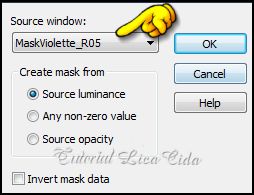
Effects → User Defined Filter → Emboss_3.
Layers → Duplicate.
Layers → Merge → Merge Group.
3_.
Layers → Duplicate.
Image → Mirror.
Layers → New Mask Layer → From Image: MaskViolette_R05 — Invert mask data marcado.
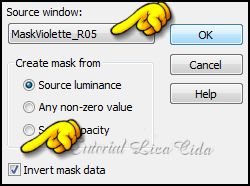
Effects → User Defined Filter → Emboss_3.
Layers → Merge → Merge Group.
4_.
Effects → Geometric Effects → Skew — Vertical — Angle: -45 — Transparent.
5_.
Plugin dsb flux → Linear Transmission: 14 / 14 / 50 — Vertical.
Effects → User Defined Filter → Emboss_3.
Layers → Merge → Merge Down.
6_.
Image → Resize: 80%.
Selections → Select All.
Selections → Modify → Contract: 50.
7_.
Effects → 3D Effects → Chisel — Color: #452e21.
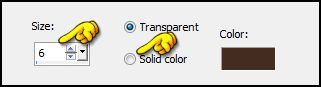
Selections → Select None.
8_.
Selections → Load/Save Selection → Load Selection From Alpha Channel → Selection #1.
Selections → Promote Selection to Layer.
Pinte com o gradiente formado no item 1.
9_.
Repita o item 7: Effects → 3D Effects → Chisel (veja o print).
10_.
Selections → Modify → Contract: 16.
11_.
Effects → 3D Effects → Chisel — Color: #452e21.
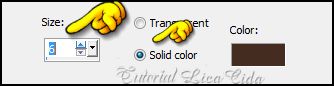
12_.
Edit → Copy no tube Alies 1VR796-woman-19122013
Edit → Paste Into Selection.
13_.
Plugin Alien Skin Eye Candy 5: Impact → Glass.

Selections → Select None.
14_.
Layers → Duplicate (duas vezes).
Ative a Copy of Promoted Selection.
Repita o item 4: Effects → Geometric Effects → Skew — Vertical — Angle: -45 — Transparent.
Effects → Image Effects → Offset: 113 / -50.
Layers → Arrange → Move Down.
15_.
Ative a Copy (2) of Promoted Selection.
Image → Resize: 80%.
Effects → Image Effects → Offset: 245 / -50.
Layers → Merge → Merge Down (duas vezes).
16_.
Ative a Raster 1.
Selections → Load/Save Selection → Load Selection From Alpha Channel → Selection #2.
Selections → Promote Selection to Layer.
Repita os itens 7 (veja o print) e 10.
17_.
Effects → 3D Effects → Chisel — Color: #452e21.
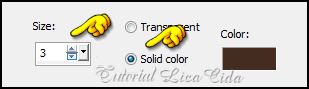
18_.
Repita o item 13 (veja o print).
Selections → Select None.
19_.
Effects → 3D Effects → Drop Shadow: 0 / 0 / 80 / 40,00 — Color: #000000.
Aplique também nas layers superiores.
20_.
Ative a Raster 1.
Layers → New Raster Layer.
Plugin dsb flux → Electrosphere.
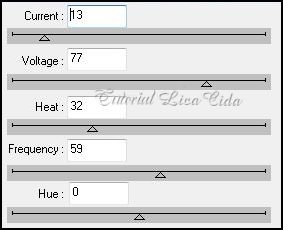
21_.
Layers → New Raster Layer.
Selections → Select All.
Edit → Copy no tube Alies 1VR796-woman-19122013
Edit → Paste Into Selection.
Selections → Select None.
22_.
Adjust → Blur → Radial Blur.
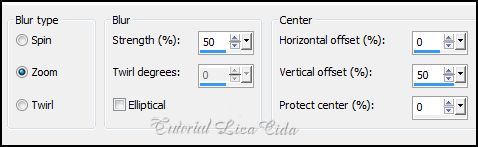
23_.
Plugin Unlimited 2.0 → Paper Textures → Canvas, Fine: 156 / 87.
LAYERS

24_.
Duplique algumas layers e altere os Blend Modes e a Opacity das layers (use a gosto).

25_.
Edit → Copy no tube Alies 1VR796-woman-19122013
Edit → Paste As New Layer.
Image → Resize: 90%.
Posicione a gosto.
OPCIONAL
Nas layers em que foi usado o Plugin Alien Skin Eye Candy 5: Impact → Glass, aplique o Plugin Xero → Clarity → Default.
Nas layers da mask, dê pequenas pinceladas com a ferramenta Eraser — Size: 70, como mostra o print.

26_.
Image → Add Borders: 3 px — Symmetric marcado — Color: #452e21.
Image → Add Borders: 2 px — Symmetric marcado — Color: #d3cbbd.
Aplique a marca-d'água.
Assine e salve.
Espero que gostem.
Aparecida / LicaCida, janeiro de 2014.
Rio de Janeiro - Brasil.


VOLTAR
Copyright ©2026 - Web Design - Naise Minas
|

