|
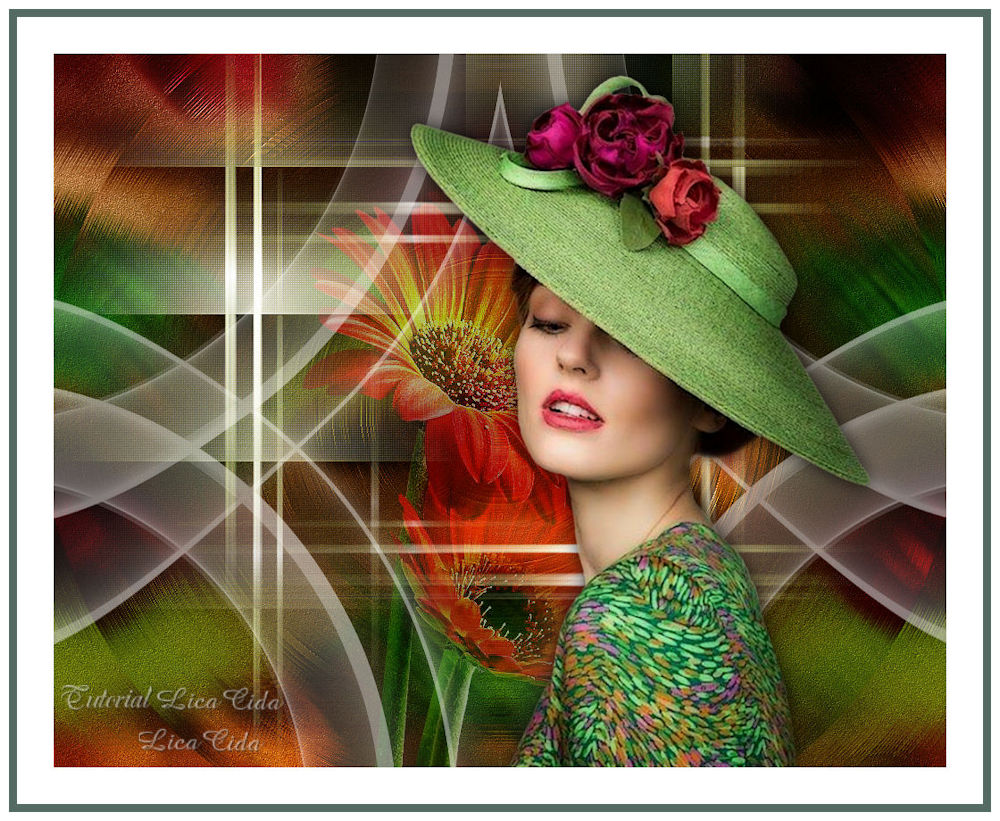
Lady of Green
TRADUÇÕES

MATERIAL

Tubes: vvs-woman1535
Gabry-fiori 72-17
Decos: decoAlc
decoBlc
Marca-d'água.
Efeitos do PSP.
Versão usada: PSP X8.
PLUGINS
Plugin Filters Unlimited 2 → &<Bkg Designer sf10 I>
Plugin FM Tile Tools → Blend Emboss
Plugin AbstractCurves → AbstractCurves
Plugin Toadies → Weaver
Plugin Nik Software → Color Efex Pro 3.0 → Bi-Color User Defined
Plugin AAA Filters → Custom
Plugin Richard Rosenman → Solid Border
TUTORIAL
|
Esta seta marca sua linha
Clique e arraste para movê-la
|
|
1_.
Abra uma nova imagem de 1000 x 800 px.
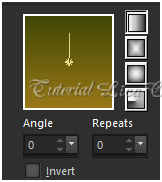
Pinte com o gradiente formado pelas cores #987818 e #414707.
Configure: Style: Linear — Angle: 0 — Repeats: 0 — Invert desmarcado.
2_.
Selections → Select All.
Edit → Copy no tube vvs-woman1535
Edit → Paste Into Selection.
Selections → Select None.
Effects → Image Effects → Seamless Tiling: Default.
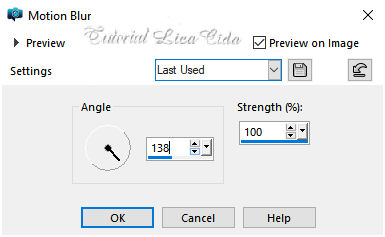
Adjust → Blur → Motion Blur. Aplique duas vezes.
3_.
Plugin Filters Unlimited 2 → &<Bkg Designer sf10 I>.
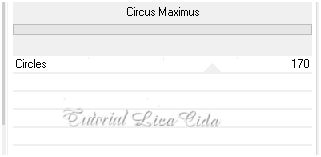
Adjust → Add/Remove Noise → JPEG Artifact Removal — Maximum — C: 79.
Plugin FM Tile Tools → Blend Emboss.
Layers → Duplicate.
Image → Mirror.
Blend Mode: Overlay — Opacity: 50%.
Layers → Merge → Merge Down.
4_.
Layers → New Raster Layer.
Selections → Select All.
Edit → Copy no decoAlc
Edit → Paste Into Selection.
Selections → Select None.
5_.
Repita o item 3:
Plugin Filters Unlimited 2 → &<Bkg Designer sf10 I> (veja o print).
Blend Mode: Soft Light — Opacity: 65%.
6_.
Layers → New Raster Layer.
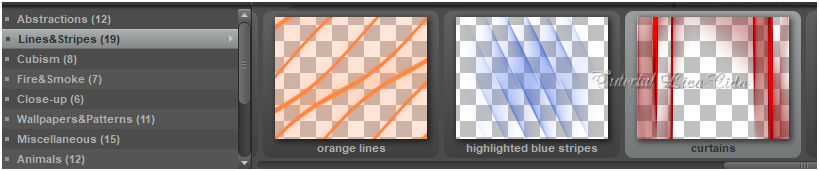
Plugin AbstractCurves → AbstractCurves — Lines&Stripes (19) — curtains.
7_.
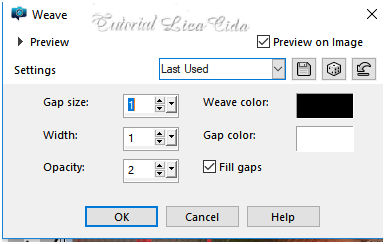
Effects → Texture Effects → Weave.
Effects → Edge Effects → Enhance.
8_.
Edit → Copy no decoBlc
Edit → Paste As New Layer.
Blend Mode: Screen.
Layers → Arrange → Move Down.
Layers → Duplicate.
9_.
Plugin Toadies → Weaver — Default (59 / 48 / 222).
10_.
Repita: Effects → Texture Effects → Weave (print do item 7).
11_.
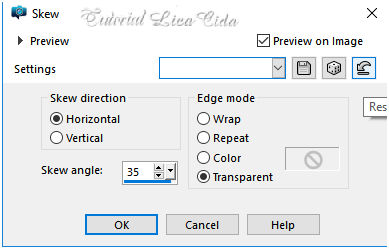
Ative a Raster 3.
Effects → Geometric Effects → Skew.
12_.
Effects → Reflection Effects → Rotating Mirror: H: 0 / R: 180 — Repeat.
Layers → Duplicate.
Image → Flip.
13_.
Effects → Image Effects → Offset.
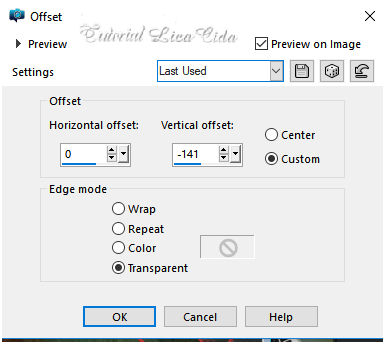
Layers → Merge → Merge Down.
14_.
Adjust → Hue and Saturation → Hue Map (Opacity abaixo).
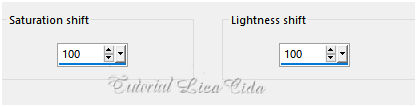
Effects → Distortion Effects → Pinch — Strength: 100%.
Opacity: 59%.
15_.
Duplique a Raster 1.
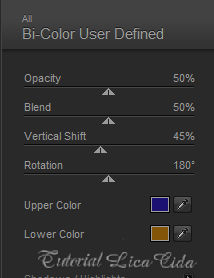
Plugin Nik Software → Color Efex Pro 3.0 → Bi-Color User Defined.
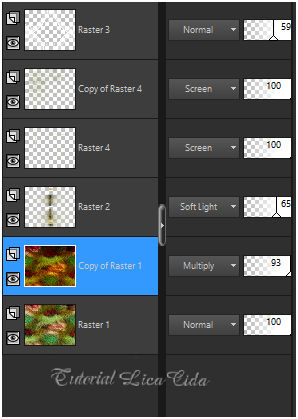
LAYERS
Altere os Blend Modes e a Opacity das layers (use a gosto).
16_.
Use acima da Raster 2:
Edit → Copy no tube Gabry-fiori 72-17
Edit → Paste As New Layer.
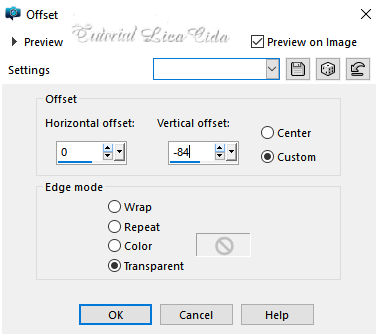
Effects → Image Effects → Offset.
Plugin AAA Filters → Custom — Landscape (Default).
Opacity: 55%.
17_.
Use acima da layer superior:
Edit → Copy no tube vvs-woman1535
Edit → Paste As New Layer.
Posicione.
Image → Add Borders: 50 px, Symmetric marcado — Color: #ffffff.
18_.
Plugin Richard Rosenman → Solid Border — Color: #546b63.
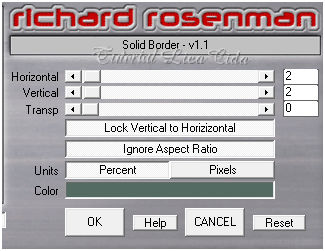
Image → Add Borders: 10 px, Symmetric marcado — Color: #ffffff.
Image → Resize — Width: 1000 px.
Aplique a marca-d'água.
Assine e salve.
Espero que gostem.
Aparecida / LicaCida, janeiro de 2019.
Rio de Janeiro - Brasil.

VOLTAR
Copyright ©2026 - Web Design - Naise Minas
|


