|
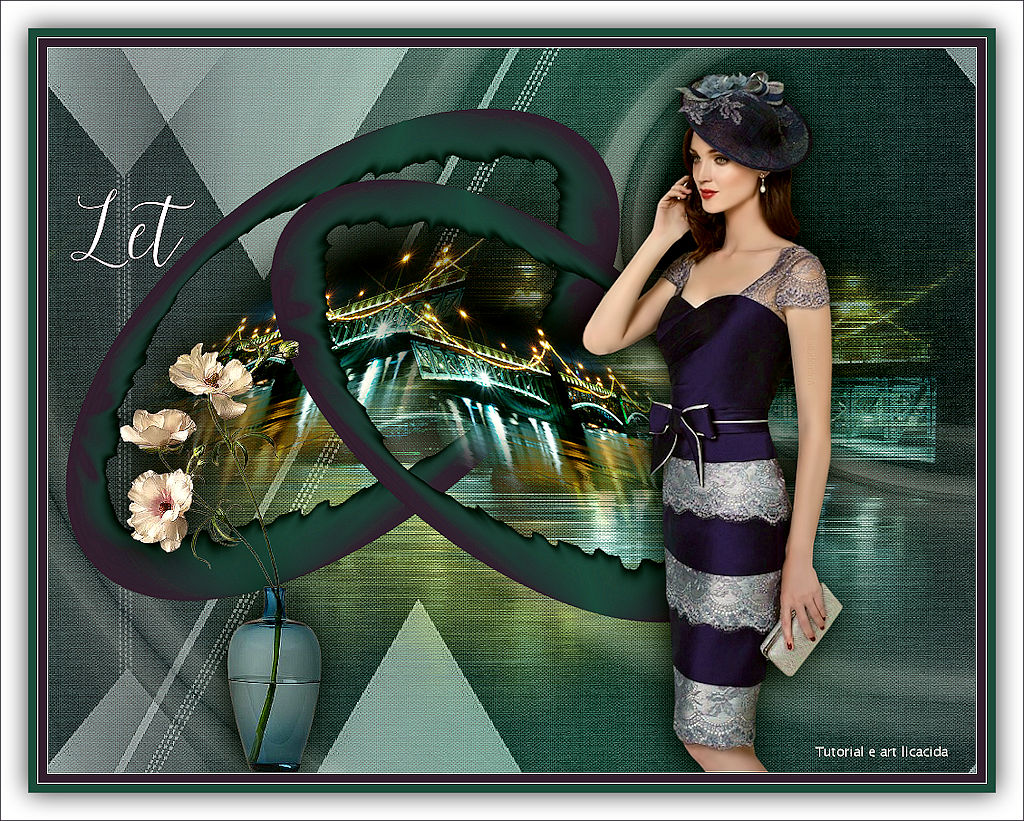
Let
TRADUÇÕES

MATERIAL

Seleção: let-mp --
Salvar na pasta Selections do PSP.
Tubes: 158_Femme_Page6_Animabelle
_145_paysage_p3_animabelle
Decor: Callitubes-115flores
Mask: NarahsMasks_1644
Texto: texto_lc
Marca-d'água.
Efeitos do PSP.
Versão usada: PSP X9.
PLUGINS
Plugin Alien Skin Xenofex 2 → Burnt Edges
Plugin dsb flux → Blast
Plugin Carolaine and Sensibility → CS-LDots
Plugin Paper Texture → Canvas Fine
Plugin AAA Filters → Custom
Plugin Alien Skin Eye Candy 5: Impact → Perspective Shadow
TUTORIAL
|
Esta seta marca sua linha
Clique e arraste para movê-la
|
|
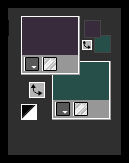
Configure: Foreground: #382c3d — Background: #284f49.
1_.
Abra uma nova imagem transparente de 1024 x 800 px.
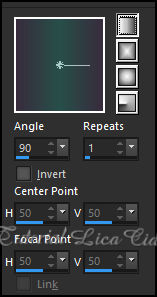
Pinte com o gradiente Linear, formado pelas cores configuradas acima.
2_.
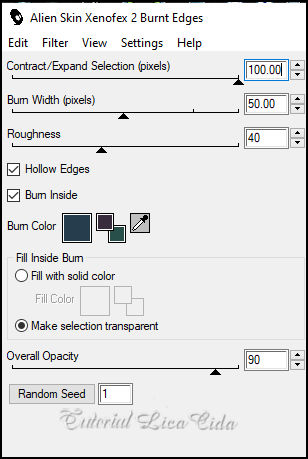
Plugin Alien Skin Xenofex 2 → Burnt Edges.
3_.
Effects → Geometric Effects → Circle — Transparent.
4_.
Com a ferramenta Magic Wand (Default), selecione a parte interna do círculo formado.
5_.
Layers → New Raster Layer.
Edit → Copy no misted _145_paysage_p3_animabelle
Edit → Paste Into Selection.
Selections → Select None.
Adjust → Sharpness → Sharpen.
Layers → Merge → Merge Down.
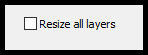
Image → Resize: 90% — Resize all layers desmarcado.
6_.
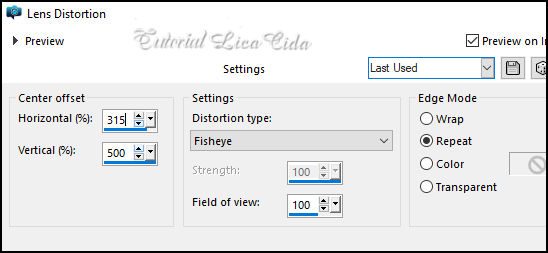
Effects → Distortion Effects → Lens Distortion.
Layers → Duplicate.
Image → Mirror → Mirror Horizontal.
Image → Resize: 90% — Resize all layers desmarcado.
7_.
Ative a Raster 1.
Com a ferramenta Pick Tool: Position X: 19 — Position Y: 66.
Pressione a tecla M para desativar a ferramenta.
8_.
Ative a layer superior.
Layers → Merge → Merge Down.
Plugin Alien Skin Eye Candy 5: Impact → Perspective Shadow (use a gosto).
Retire a visibilidade da Raster 1, para visualizar melhor o trabalho.
9_.
Selections → Load/Save Selection → Load Selection From Disk → let-mp.
10_.
Layers → New Raster Layer.
Pinte com a cor #ffffff.
Selections → Select None.
11_.
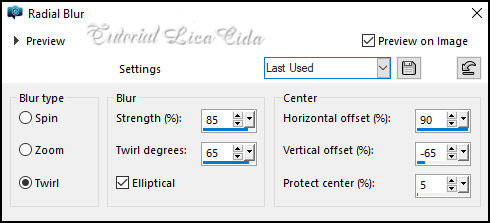
Adjust → Blur → Radial Blur.
12_.
Effects → Artistic Effects → Enamel.
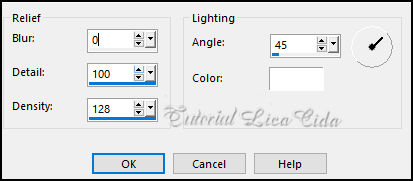
Effects → Edge Effects → Enhance More.
Layers → Arrange → Move Down.
13_.
Layers → New Raster Layer.
Layers → Arrange → Send to Bottom.
Pinte com o mesmo gradiente formado no item 1.
14_.
Selections → Select All.
Edit → Copy no misted _145_paysage_p3_animabelle
Edit → Paste Into Selection.
Selections → Select None.
15_.
Plugin dsb flux → Blast.
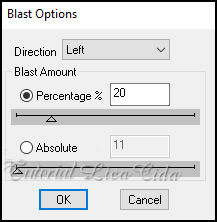
16_.
Effects → Image Effects → Seamless Tiling.
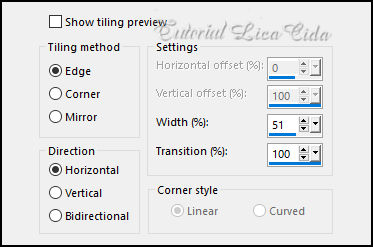
17_.
Layers → New Raster Layer.
Pinte com a cor #ffffff.
18_.
Layers → New Mask Layer → From Image: NarahsMasks_1644.
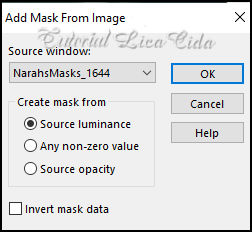
Effects → Edge Effects → Enhance.
Layers → Merge → Merge Group.
19_.
Effects → Image Effects → Seamless Tiling (print do item 16).
20_.
Effects → Artistic Effects → Enamel (print do item 12).
Opacity: 50% — Blend Mode: Luminance (L).
21_.
Plugin Carolaine and Sensibility → CS-LDots.
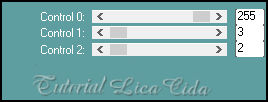
Plugin Alien Skin Eye Candy 5: Impact → Perspective Shadow (use a gosto).
Ative a Raster 3.
22_.
Plugin Paper Texture → Canvas Fine — Default (156 / 87).
23_.
Effects → Photo Effects → Film and Filters.
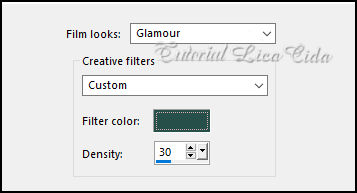
24_.
Plugin AAA Filters → Custom → Landscape.
Ative a visibilidade da Raster 1.
Altere os Blend Modes e a Opacity das layers.
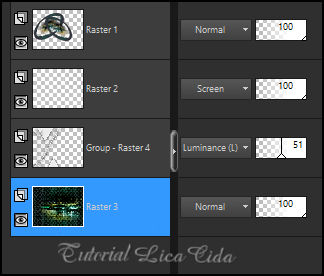
25_.
Edit → Copy no tube 158_Femme_Page6_Animabelle
Edit → Paste As New Layer.
Adjust → Sharpness → Sharpen.
Posicione.
Drop Shadow a gosto.
26_.
Edit → Copy no Callitubes-115flores
Edit → Paste As New Layer.
Adjust → Sharpness → Sharpen.
Posicione.
Drop Shadow a gosto.
27_.
Edit → Copy no texto_lc ("Let")
Edit → Paste As New Layer.
Posicione a gosto.
BORDAS
Image → Add Borders: 1 px, Symmetric marcado — Color: #ffffff.
Image → Add Borders: 10 px, Symmetric marcado — Color: #284f49 (Background).
Image → Add Borders: 1 px, Symmetric marcado — Color: #ffffff.
Image → Add Borders: 10 px, Symmetric marcado — Color: #382c3d (Foreground).
Selections → Select All.
Image → Add Borders: 30 px, Symmetric marcado — Color: #ffffff.
Effects → 3D Effects → Drop Shadow: 0 / 0 / 80 / 40,00 — Color: #000000.
Image → Add Borders: 1 px, Symmetric marcado — Color: #284f49 (Background).
Selections → Select None.
Aplique a marca-d'água.
Assine e salve.
Image → Resize: Width 1024 px.
Espero que gostem.
Obrigada!
Aparecida / LicaCida, maio de 2022.
Rio de Janeiro - Brasil.

VOLTAR
Copyright ©2026 - Web Design - Naise Minas
|


