|
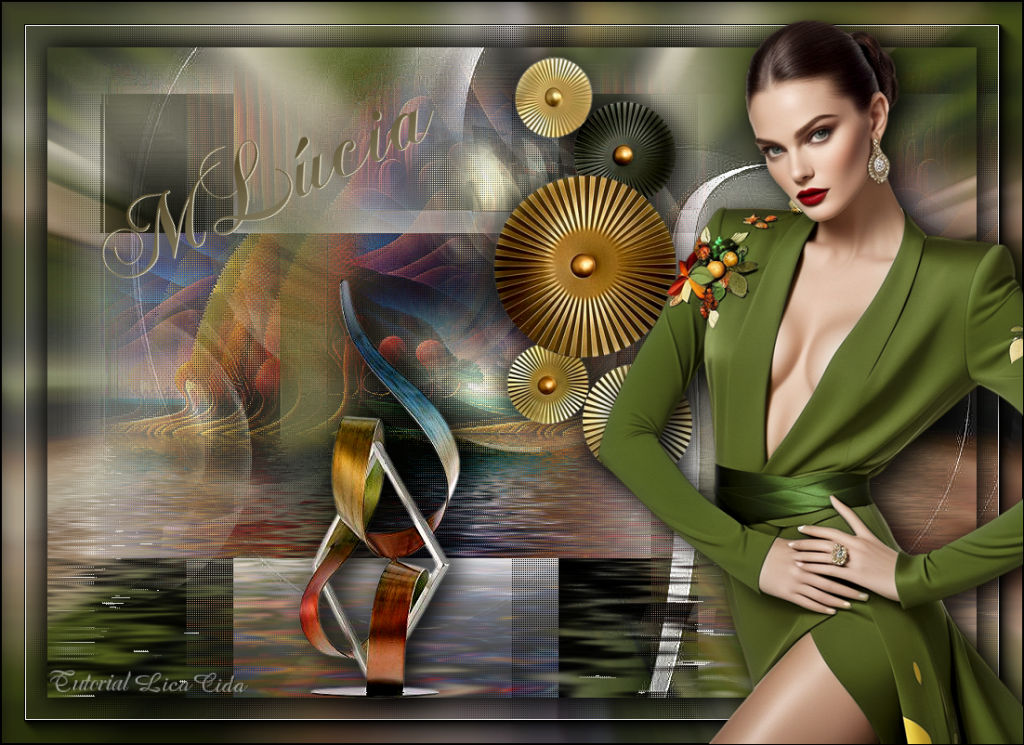
Maria Lúcia
TRADUÇÕES

MATERIAL

Tubes: SuizaBella_Ref_AG-003856
Renee-TUBES-Paysages-20
Masks: NarahsMasks_1758
BgJ2dSfv4uELUikXYNpJCDTgLSc
Decor: Callitubes-447decor
Callitubes-459decor
Título: titulobylc
Marca-d'água.
Efeitos do PSP.
PLUGINS
Plugin Ulead Effects → Effect Bubble
Plugin Flaming Pear → Flood
Plugin L en K's → Katharina
Plugin AAA Frames → Foto Frame
TUTORIAL

|
Esta seta marca sua linha
Clique e arraste para movê-la
|
|
Abra o material no PSP, duplique e feche os originais.
Escolha duas cores para trabalhar: #d7d1b7 e #ffffff.
1_.
Abra uma nova imagem transparente de 1000 x 700 px.
2_.
Pinte com a cor #d7d1b7.
3_.
Layers → New Raster Layer.
Selections → Select All.
Edit → Copy no tube SuizaBella_Ref_AG-003856
Edit → Paste Into Selection.
Selections → Select None.
4_.
Effects → Image Effects → Seamless Tiling: Default.
5_.
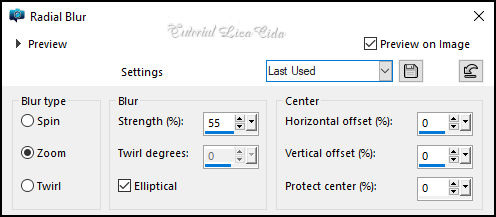
Adjust → Blur → Radial Blur.
Adjust → Sharpness → Sharpen More.
6_.
Layers → New Raster Layer.
Pinte com a cor #ffffff.
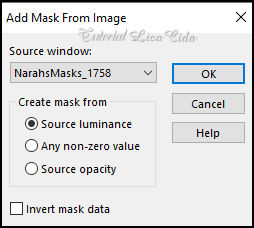
Layers → New Mask Layer → From Image: NarahsMasks_1758 (anexada ao material).
Effects → Edge Effects → Enhance.
Layers → Merge → Merge Group.
Drop Shadow a gosto.
7_.
Edit → Copy no tube Renee-TUBES-Paysages-20
Edit → Paste As New Layer.
8_.
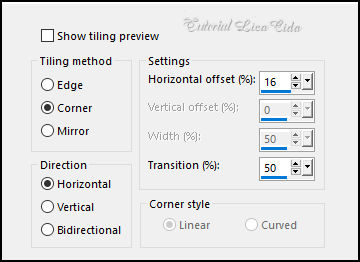
Effects → Image Effects → Seamless Tiling.
9_.
Opcional: suba um pouco a paisagem (mais ou menos 50 px).
10_.
Layers → New Mask Layer → From Image: BgJ2dSfv4uELUikXYNpJCDTgLSc (anexada ao material).
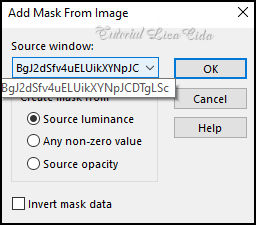
Effects → Edge Effects → Enhance.
Layers → Merge → Merge Group.
11_.
Plugin Ulead Effects → Effect Bubble: Default.
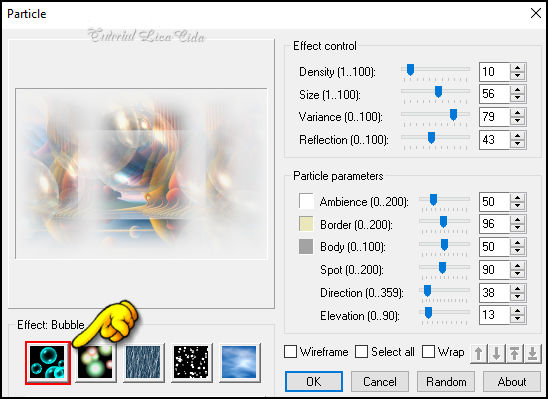
Effects → Edge Effects → Enhance.
12_.
Plugin Flaming Pear → Flood.
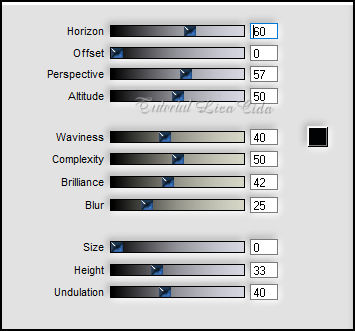
13_.
Edit → Copy no Callitubes-447decor
Edit → Paste As New Layer.
Image → Resize: 80% — Resize all layers desmarcado.
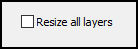
14_.
Com a ferramenta Pick Tool: Position X: 480 — Position Y: 9.
Drop Shadow a gosto.
15_.
Use nas layers indicadas:
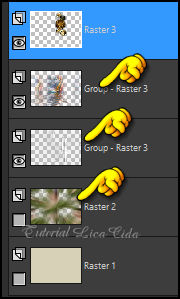
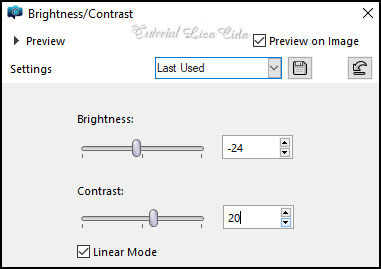
Adjust → Brightness and Contrast → Brightness/Contrast.

16_.
Ative a layer do misted Renee-TUBES-Paysages-20 (Group - Raster 3).
17_.
Effects → Texture Effects → Weave.
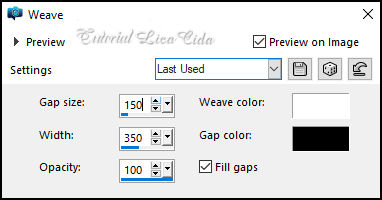
Layers → Duplicate.
Layers → Merge → Merge Down.
18_.
Plugin Ulead Effects → Effect Bubble: Default.
Layers → Duplicate.
Layers → Merge → Merge Down.
19_.
Plugin L en K's → Katharina.
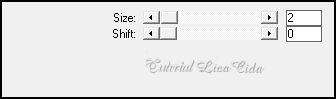
LAYERS
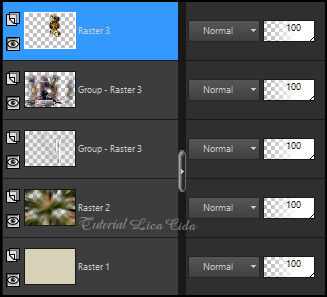
20_.
Na layer do topo:
Edit → Copy Special → Copy Merged.
BORDAS
21_.
Selections → Select All.
Image → Add Borders: 50 px, Symmetric marcado — Color: #ffffff.
Selections → Invert.
Edit → Paste Into Selection.
Adjust → Blur → Radial Blur (valores acima).
Plugin L en K's → Katharina (valores acima).
Adjust → Sharpness → Sharpen.
Plugin AAA Frames → Foto Frame: Width: 25 — Matte: 1, demais valores Default.
Selections → Invert.
Effects → 3D Effects → Drop Shadow: 0 / 0 / 80 / 40,00 — Color: #000000.
Selections → Select None.
22_.
Edit → Copy no tube SuizaBella_Ref_AG-003856
Edit → Paste As New Layer.
Posicione.
23_.
Edit → Copy no Callitubes-459decor
Edit → Paste As New Layer.
Posicione.
24_.
Use o título (titulobylc) a gosto.
Image → Resize: Width 1024 px.
Aplique a marca-d'água.
Assine e salve.
File → Export → JPEG Optimizer.
Aparecida / LicaCida.
Rio de Janeiro - Brasil.

VOLTAR
Copyright ©2026 - Web Design - Naise Minas
|


