|
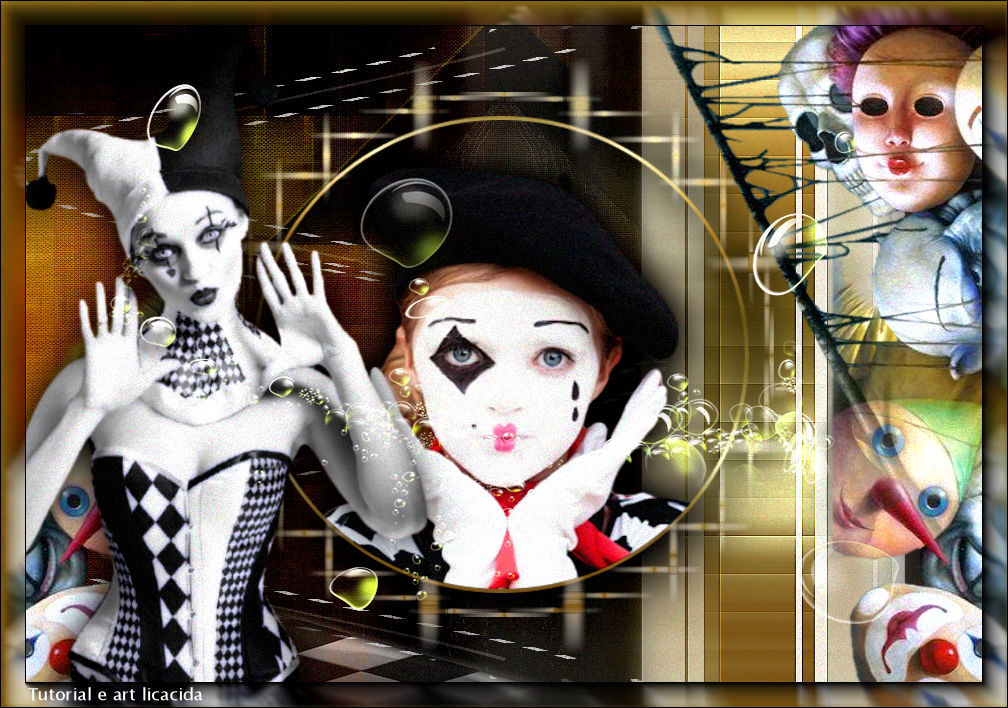
Mascarade Carnaval 2023
TRADUÇÕES

MATERIAL

Seleção: sel-circulo-lc --
Salvar na pasta Selections do PSP.
Imagem: grafico_bylc
Tubes: Callitubes-10carnaval
Renee_tube_Carnaval2017
Renee_TUBES_Fev.45
Renee-TUBES-Carnaval2023-2 (o tapete)
Decor: deco1-lc
element_1 (arquivo da net)
elemento-2lc
Gradiente: Corel_06_017 (Metal brass)
Mask: gradientedworisch
Marca-d'água.
Efeitos do PSP.
PLUGINS
Plugin Filters Unlimited 2 → Paper Textures → Canvas, Fine
Plugin Filters Unlimited 2 → &<Bkg Designer sf10 I> → Bee Morph
Plugin Filters Unlimited 2 → &<BKg Designer sf10 II> → DIS Refractor 2
Plugin Mehdi → Sorting Tiles
Plugin Mehdi → Weaver
Plugin Simple → Blintz
Plugin AP [Lines] → Silver Lining
Plugin Toadies → What Are You?
Plugin Alien Skin Eye Candy 5: Impact → Perspective Shadow
Plugin AAA Frames → Foto Frame
TUTORIAL
|
Esta seta marca sua linha
Clique e arraste para movê-la
|
|
1_.
Abra a imagem grafico_bylc (no material).
Layers → Promote Background Layer.
2_.
Plugin Filters Unlimited 2 → Paper Textures → Canvas, Fine — Default: 156 / 87.
3_.
Layers → New Raster Layer.
Pinte com a cor #f7b73b (use uma cor que combine com o gráfico).
4_.
Plugin Filters Unlimited 2 → &<Bkg Designer sf10 I> → Bee Morph.
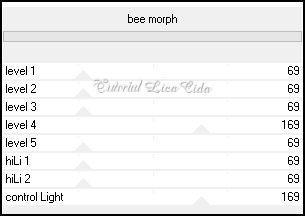
Adjust → Sharpness → Sharpen.
5_.
Plugin Mehdi → Sorting Tiles.
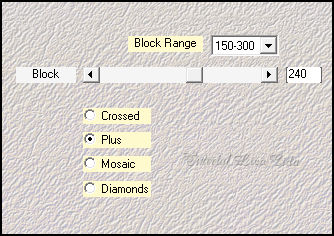
6_.
Plugin Mehdi → Weaver.
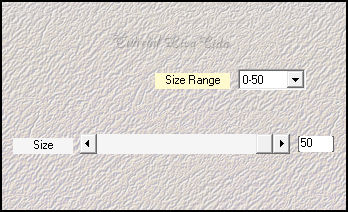
Adjust → Sharpness → Sharpen.
Blend Mode: Soft Light.
7_.
Plugin Simple → Blintz.
Effects → User Defined Filter → Emboss_3.
8_.
Edit → Copy no deco1-lc
Edit → Paste As New Layer.
9_.
Plugin AP [Lines] → Silver Lining.
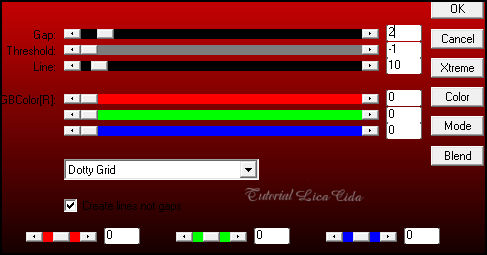
10_.
Adjust → Hue and Saturation → Vibrancy: 42.
Layers → Arrange → Move Down.
Blend Mode: Hard Light — Opacity: 55%.
11_.
Ative a layer do topo (Raster 2).
Ative a ferramenta Selection Tool (tecla S) → Custom Selection.
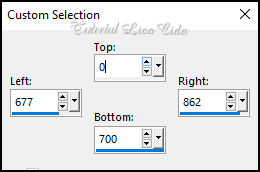
12_.
Layers → New Raster Layer.
Pinte com o gradiente dourado Corel_06_017 (Metal brass), que está no material, ou outro a gosto.
Configure: Style: Linear — Angle: 0 — Repeats: 0 — Invert desmarcado.
Selections → Select None.
13_.
Plugin Toadies → What Are You?: 20 / 20.
14_.
Plugin Filters Unlimited 2 → &<BKg Designer sf10 II> → DIS Refractor 2.
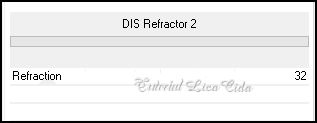
15_.
Plugin Alien Skin Eye Candy 5: Impact → Perspective Shadow.
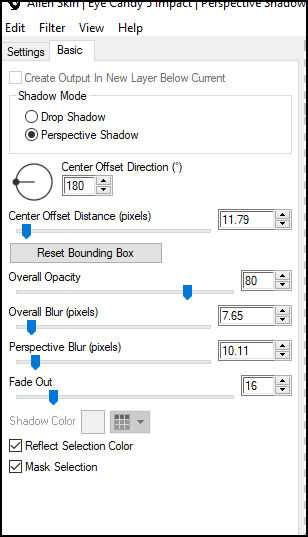
16_.
Edit → Repeat, com os valores a seguir:
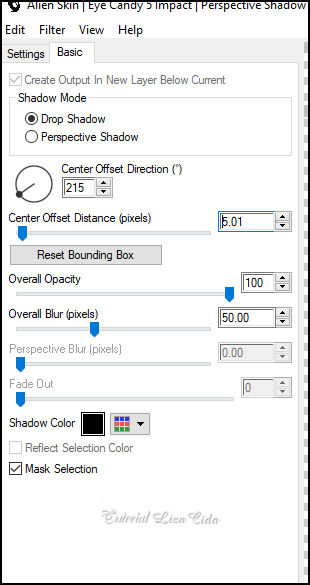
17_.
Edit → Copy no elemento-2lc
Edit → Paste As New Layer.
Posicione.
Layers → Duplicate.
Image → Mirror → Mirror Vertical.
Layers → Merge → Merge Down.
18_.
Selections → Load/Save Selection → Load Selection From Disk → sel-circulo-lc.
19_.
Layers → New Raster Layer.
Pinte com o gradiente Corel_06_017 (Metal brass).
20_.
Selections → Modify → Contract: 4 px.
Pressione a tecla Delete.
Mantenha a seleção.
21_.
Edit → Copy no tube Renee_TUBES_Fev.45
Edit → Paste As New Layer.
Posicione (sem resize).
Selections → Invert.
Pressione a tecla Delete.
Selections → Select None.
22_.
Layers → Duplicate (no círculo).
Image → Resize: 110% — Resize all layers desmarcado.
Plugin Mehdi → Weaver, com os mesmos valores do item 6.
Layers → Duplicate.
Layers → Merge → Merge Down.
23_.
Ative a layer do topo.
Layers → Merge → Merge Down (duas vezes).
Plugin Alien Skin Eye Candy 5: Impact → Perspective Shadow, a gosto.
LAYERS
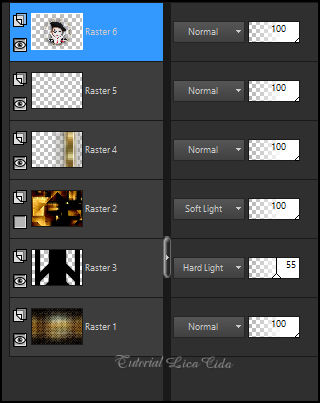
24_.
Edit → Copy no Renee-TUBES-Carnaval2023-2 (o tapete — sol)
Edit → Paste As New Layer.
Image → Mirror → Mirror Vertical.
25_.
Com a ferramenta Pick Tool: Position X: -48 / Position Y: 582.
Tecle M para desativar a ferramenta.
Blend Mode: Luminance (L).
26_.
Edit → Copy no tube Callitubes-10carnaval
Edit → Paste As New Layer.
Posicione a gosto sobre o tapete (sol).
Aplique Drop Shadow como preferir.
27_.
Edit → Copy no tube Renee_tube_Carnaval2017 (no material, da forma como usei)
Edit → Paste As New Layer.
Posicione a gosto. Usei a mask gradientedworisch para suavizar alguns efeitos.
Aplique Drop Shadow como preferir.
28_.
Edit → Copy no element_1 (arquivo da net)
Edit → Paste As New Layer.
Blend Mode: Screen.
BORDAS
Image → Add Borders: 1 px, Symmetric marcado — Color: #000000.
Image → Add Borders: 1 px, Symmetric marcado — Color: #f7b73b.
Image → Add Borders: 1 px, Symmetric marcado — Color: #000000.
Image → Add Borders: 1 px, Symmetric marcado — Color: #f7b73b.
29_.
Plugin AAA Frames → Foto Frame: Width: 25 — demais valores Default.
Aplique a marca-d'água.
Assine e salve.
Espero que apreciem.
Aparecida / LicaCida, fevereiro de 2023.
Rio de Janeiro - Brasil.

VOLTAR
Copyright ©2026 - Web Design - Naise Minas
|


