|
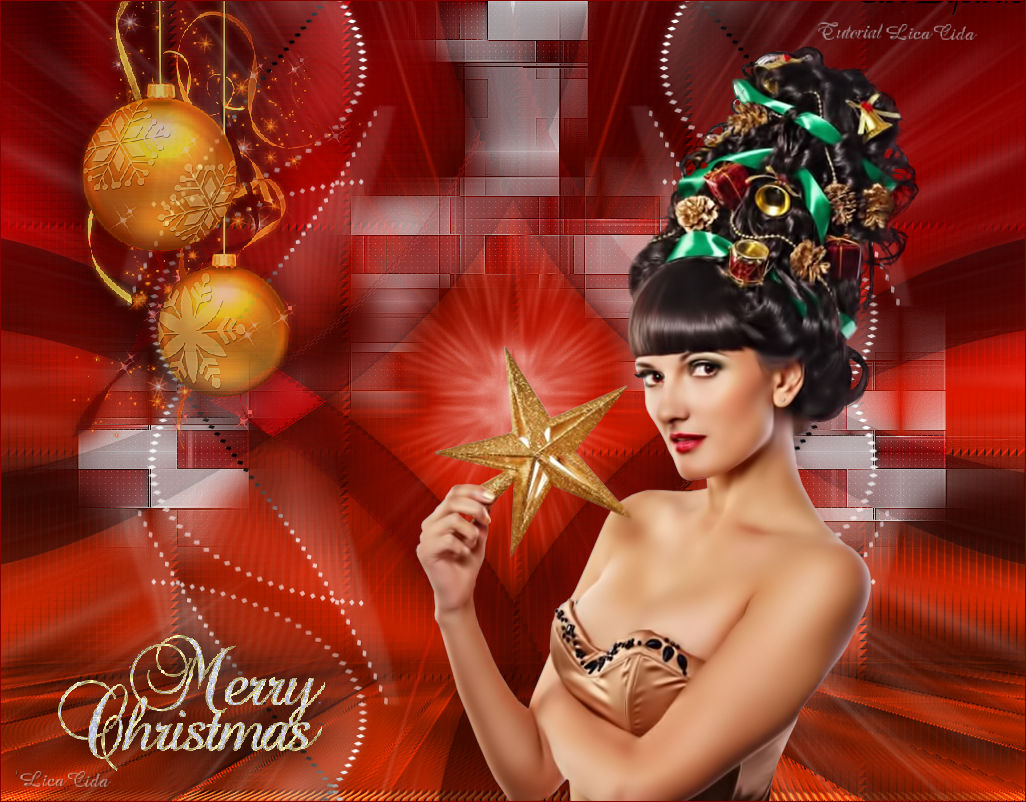
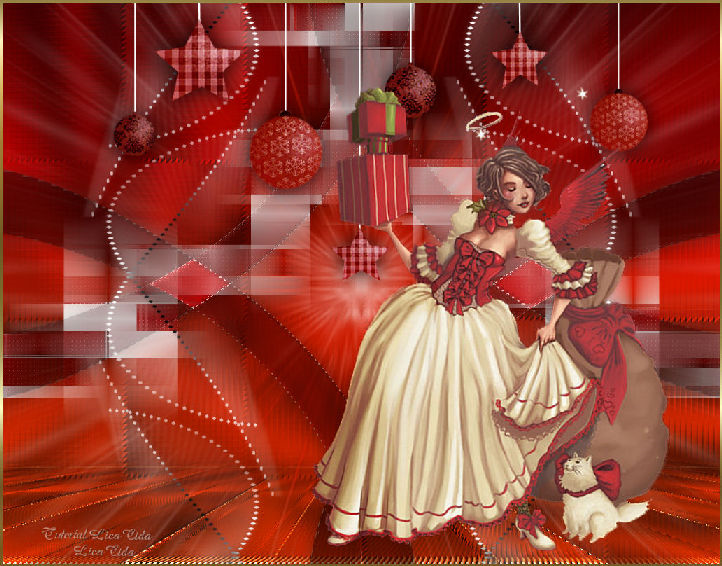
Merry Christmas
TRADUÇÕES

MATERIAL

Tube: Beauty_Xmas_time_CibiBijoux
Decos: 6032dwtubes
mp-efeito
luzvermelha
decolcnatal
Merry Christmas
Gradiente: CatoeCountry66
Marca-d'água.
Efeitos do PSP.
Versão usada: PSP X8.
PLUGINS
Plugin VM Distortion → Vision Impossible
Plugin Kiwi's Oelfilter → Zig-Zack
Plugin Carolaine and Sensibility → CS-LDots
Plugin Carolaine and Sensibility → CS-Reflection
Plugin MuRa's Meister → Perspective Tiling
Plugin Nik Software → Color Efex Pro 3.0 → Bi-Color Filters
Plugin dsb flux → Radial Transmission
TUTORIAL

|
Esta seta marca sua linha
Clique e arraste para movê-la
|
|
1_.
Abra uma nova imagem transparente de 1024 x 800 px.
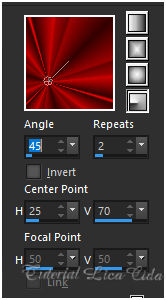
Pinte com o gradiente CatoeCountry66 (em anexo).
Configure: Style: Radial — Angle: 45 — Repeats: 2 — Center Point: H: 25 / V: 70.
Adjust → Blur → Gaussian Blur — Radius: 22,00.
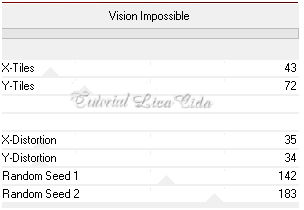
Plugin VM Distortion → Vision Impossible.
Effects → Edge Effects → Dilate.
Plugin Kiwi's Oelfilter → Zig-Zack — Default: 2 / 2 / 128 / 128.
Effects → User Defined Filter → Emboss_3.
2_.
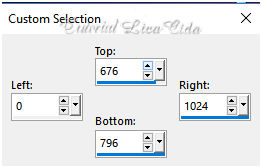
Ative a ferramenta Selection Tool (tecla S) → Custom Selection.
Selections → Promote Selection to Layer.
Effects → 3D Effects → Inner Bevel.
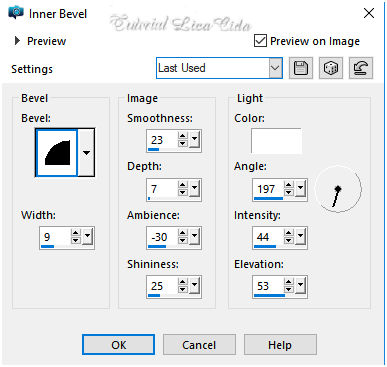
Selections → Select None.
Effects → Geometric Effects → Skew: Vertical — Angle: -45 — Transparent.
Image → Mirror → Mirror Vertical.
3_.
Layers → Duplicate.
Image → Mirror → Mirror Horizontal.
Layers → Merge → Merge Down.
Plugin Kiwi's Oelfilter → Zig-Zack — Default: 2 / 2 / 128 / 128.
A borda do efeito poderá ou não ficar branca.
Effects → Distortion Effects → Pinch — Strength: 100%.
4_.
Edit → Copy no decolcnatal
Edit → Paste As New Layer.
Objects → Align → Top.
Plugin Carolaine and Sensibility → CS-LDots — Default: 80 / 3 / 2.
Layers → Arrange → Move Down.
5_.
Ative a Raster 1.
Ative a ferramenta Selection Tool (tecla S) → Custom Selection 2.
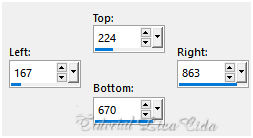
Selections → Promote Selection to Layer.
Effects → 3D Effects → Inner Bevel (veja o print do item 2).
Selections → Select None.
Plugin Kiwi's Oelfilter → Zig-Zack — Default: 2 / 2 / 128 / 128.
A borda do efeito poderá ou não ficar branca.
Effects → Image Effects → Seamless Tiling: Side by side.
Plugin MuRa's Meister → Perspective Tiling.
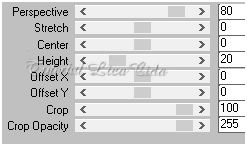
Com a ferramenta Magic Wand — Feather: 60, clique na parte transparente.
Veja a configuração:

Pressione a tecla Delete (quatro ou cinco vezes, para suavizar o efeito).
Selections → Select None.
Effects → User Defined Filter → Emboss_3.
Plugin Nik Software → Color Efex Pro 3.0 → Bi-Color Filters — Color Set: Violet/Pink 1.
Effects → 3D Effects → Drop Shadow: 0 / 0 / 80 / 40,00 — Color: #000000.
Repita, se necessário.
6_.
Aplique também na Raster 1: Plugin Nik Software → Color Efex Pro 3.0 → Bi-Color Filters — Color Set: Violet/Pink 1.
7_.
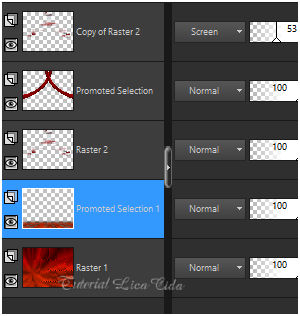
Ative a Raster 2.
Layers → Duplicate.
Layers → Arrange → Bring to Top.
Blend Mode: Screen — Opacity: 53%.
8_.
Ative a layer Promoted Selection.
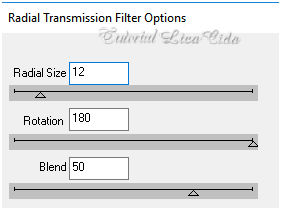
Plugin dsb flux → Radial Transmission.
Plugin Carolaine and Sensibility → CS-Reflection.
Effects → 3D Effects → Drop Shadow: 0 / 0 / 80 / 40,00 — Color: #000000.
9_.
Edit → Copy no luzvermelha
Edit → Paste As New Layer.
Layers → Arrange → Move Down.
Adjust → Sharpness → Sharpen More.
10_.
Edit → Copy no mp-efeito
Edit → Paste As New Layer.
Layers → Arrange → Bring to Top.
11_.
Edit → Copy no 6032dwtubes e no Merry Christmas
Edit → Paste As New Layer.
Posicione.
12_.
Edit → Copy no tube Beauty_Xmas_time_CibiBijoux
Edit → Paste As New Layer.
Posicione.
13_.
Image → Add Borders: 1 px, Symmetric marcado — Color: uma cor que combine.
Aplique a marca-d'água.
Assine e salve.
Espero que gostem. Obrigada!
Aparecida / LicaCida, dezembro de 2017.
Rio de Janeiro - Brasil.
OUTROS MODELOS


VOLTAR
Copyright ©2026 - Web Design - Naise Minas
|


