|
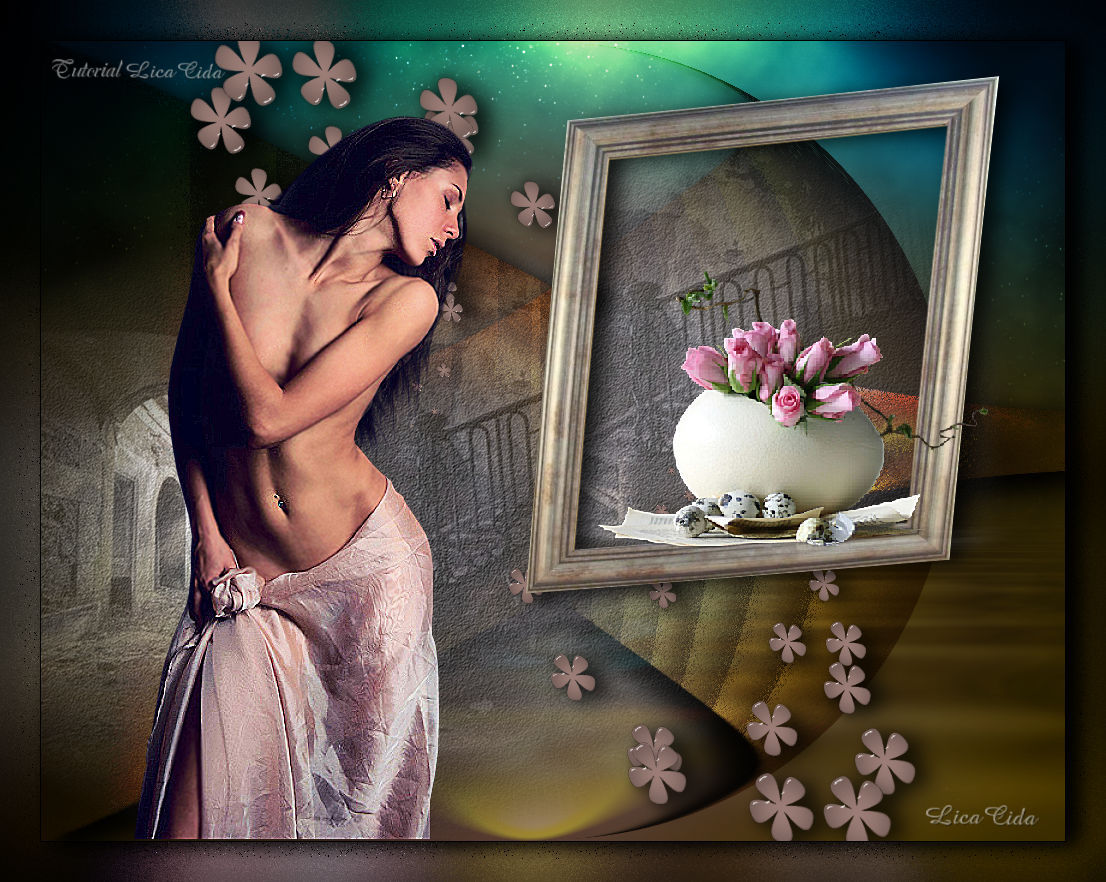
Miss You and Flowers
TRADUÇÕES

MATERIAL

Preset: katrina — Eye Candy 5: Impact → Glass --
Dê um duplo clique no preset para importá-lo ao plugin.
Backs: back1lc
back2lc
Tubes: anna.br_absorta.1044
Escalier 02.10 tubed by corinne.vicaire
MR_Roses in egg
Shapes: Basic Shapes
Frame: framenet-arquivo
Marca-d'água.
Efeitos do PSP.
Versão usada: PSP X8.
PLUGINS
Plugin Nik Software → Color Efex Pro 3.0 → Bi-Color Filters
Plugin DCspecial → Rain
Plugin Alien Skin Eye Candy 5: Impact → Perspective Shadow
Plugin Alien Skin Eye Candy 5: Impact → Glass
Plugin Xero → Tekstya
Plugin Flaming Pear → Flood
Plugin MuRa's Meister → Copies
TUTORIAL

|
Esta seta marca sua linha
Clique e arraste para movê-la
|
|
1_.
Abra o arquivo back1lc.
Layers → Duplicate.
Effects → Geometric Effects → Perspective - Horizontal: Distortion: 65 — Transparent.
Repita: Effects → Geometric Effects → Perspective - Horizontal: Distortion: 65 — Transparent.
2_.
Effects → Texture Effects → Blinds: Width: 70 — Opacity: 30 — Color: #ffffff — Light from left/top marcado.
3_.
Effects → Distortion Effects → Pinch: Strength: 100.
4_.
Plugin Nik Software → Color Efex Pro 3.0 → Bi-Color Filters — Color Set: Brown 1.
Blend Mode: Hard Light.
Adjust → Brightness and Contrast → Brightness/Contrast: Brightness: 22 — Contrast: 2.
Adjust → One Step Noise Removal.
5_.
Plugin DCspecial → Rain: 130 / 5.
Plugin Alien Skin Eye Candy 5: Impact → Perspective Shadow — Blurry.
Layers → Duplicate.
Image → Mirror → Mirror Horizontal.
6_.
Effects → Geometric Effects → Circle — Transparent.
Blend Mode: Overlay.
7_.
Edit → Copy no misted Escalier 02.10 tubed by corinne.vicaire
Edit → Paste As New Layer.
Image → Mirror → Mirror Horizontal.
Effects → Image Effects → Offset: H: -211 / V: -96 — Custom e Transparent marcados.
8_.
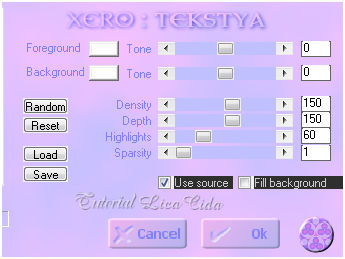
Plugin Xero → Tekstya — Color: #ffffff.
9_.
Edit → Copy no tube anna.br_absorta.1044
Edit → Paste As New Layer.
Posicione.
Image → Mirror → Mirror Horizontal.
Adjust → Sharpness → Sharpen More.
10_.
Ative a Raster 1.
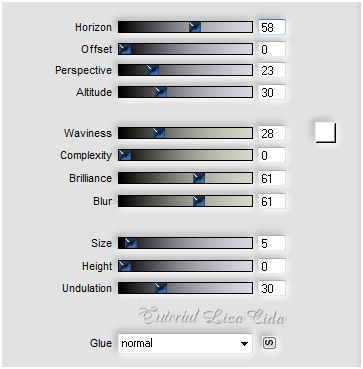
Plugin Flaming Pear → Flood.
11_.
Edit → Copy no back2lc
Edit → Paste As New Layer.
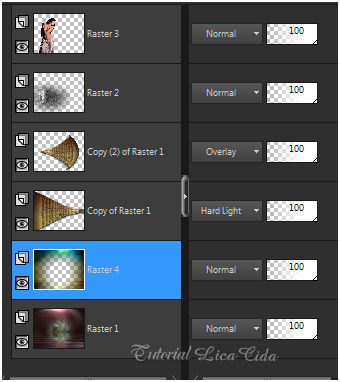
Altere os Blend Modes e a Opacity das layers.
12_.
Ative a layer superior (Raster 3).
Layers → New Raster Layer.
Ative a ferramenta Preset Shape → Flower.

Posicione e aplique.
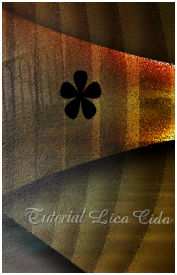
Selections → Select All.
Selections → Float.
Selections → Defloat.
Pinte a flower com uma cor retirada do tube principal (#a88780).
13_.
Plugin Alien Skin Eye Candy 5: Impact → Glass — Settings → User Settings → katrina (ou use a gosto).
Selections → Select None.
14_.
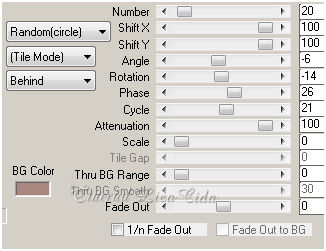
Plugin MuRa's Meister → Copies — Shower.
Layers → Duplicate.
Image → Mirror → Mirror Vertical.
Image → Mirror → Mirror Horizontal.
Layers → Arrange → Move Down (aplique duas vezes).
Nas layers das flowers, aplique:
Effects → 3D Effects → Drop Shadow: 3 / 13 / 80 / 30,00 — Color: #000000.
15_.
Na Raster 5:
Edit → Copy no framenet-arquivo
Edit → Paste As New Layer.
Effects → Distortion Effects → Lens Distortion.
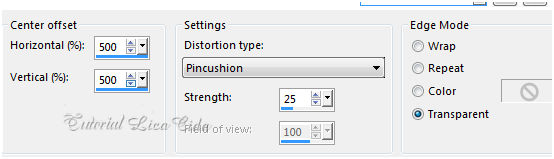
Image → Mirror → Mirror Horizontal.
Effects → Image Effects → Offset: H: 229 / V: 120 — Custom e Transparent marcados.
Effects → 3D Effects → Drop Shadow: 3 / 13 / 80 / 30,00 — Color: #000000.
16_.
Duplique o misted Escalier 02.10 tubed by corinne.vicaire e use, abaixo do frame, a parte que combine.
Apague a sobra.
17_.
Ative a layer superior.
Edit → Copy no tube MR_Roses in egg
Edit → Paste As New Layer.
Image → Resize: em proporção, a gosto.
Posicione.
Adjust → Sharpness → Sharpen More.
18_.
Image → Add Borders: 1 px, Symmetric marcado — Color: #000000.
Edit → Copy.
Image → Add Borders: 40 px, Symmetric marcado — Color: a gosto.
Selecione a borda.
Edit → Paste Into Selection.
19_.
Adjust → Blur → Gaussian Blur — Radius: 28,00.
Effects → User Defined Filter → Emboss_3.
20_.
Plugin DCspecial → Rain: 130 / 5.
Selections → Invert.
Effects → 3D Effects → Drop Shadow: 3 / 13 / 80 / 30,00 — Color: #000000.
Selections → Select None.
Aplique a marca-d'água.
Assine e salve.
Espero que gostem.
Aparecida / LicaCida, maio de 2017.
Rio de Janeiro - Brasil.


VOLTAR
Copyright ©2026 - Web Design - Naise Minas
|

