|
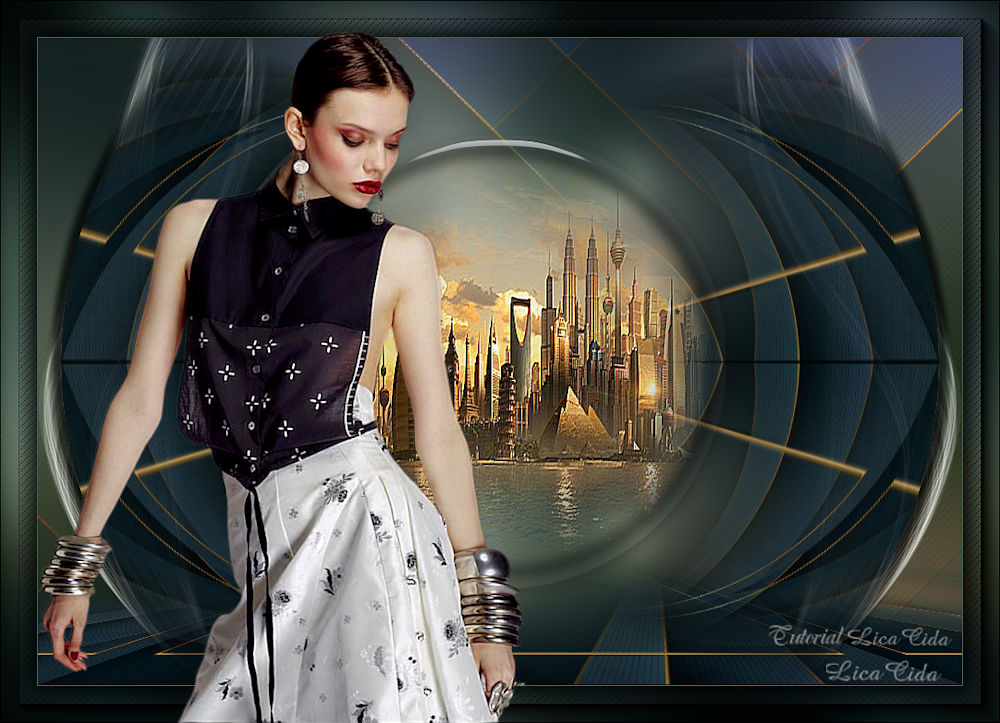
Nines
DEDICATÓRIA
Carinhosamente!
TRADUÇÕES

MATERIAL

Seleção: circulocentrallc --
Salvar na pasta Selections do PSP.
Preset: flowers (Eye Candy 5: Impact → Glass) --
Dê um duplo clique sobre o preset para importá-lo para o plugin.
Back: fondo-abstracto-moderno-linea-oro_67845-875
Gradiente: Corel_06_017 (Metal Brass)
Deco: decoraster4
Tubes: SuizaBella_Ref_AG-00906
2136-luzcristina
Marca-d'água.
Efeitos do PSP.
Versão usada: PSP X9.
PLUGINS
Plugin Mehdi → Wavy Lab 1.1
Plugin MuRa's Meister → Perspective Tiling
Plugin MuRa's Meister → Pole Transform
Plugin MuRa's Seamless → Emboss at Alpha
Plugin Alien Skin Eye Candy 5: Impact → Glass
Plugin Nik Software → Color Efex Pro 3.0 → Bi-Color User Defined
Plugin Graphics Plus → Cross Shadow
Plugin AAA Frames → Foto Frame
TUTORIAL
|
Esta seta marca sua linha
Clique e arraste para movê-la
|
|
Configure: Foreground: #ccd5c5 — Background: #445c4f.
1_.
Abra uma nova imagem transparente de 1000 x 700 px.
Plugin Mehdi → Wavy Lab 1.1: #445c4f / #ccd5c5 / #88988a / #88988a.
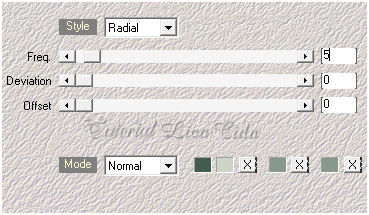
Adjust → Blur → Gaussian Blur — Radius: 38,00.
2_.
Layers → New Raster Layer.
Selections → Select All.
Edit → Copy no fondo-abstracto-moderno-linea-oro_67845-875
Edit → Paste Into Selection.
Selections → Select None.
3_.
Effects → Texture Effects → Weave.
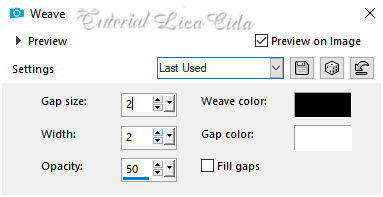
Layers → Duplicate.
4_.
Selections → Select All.
Selections → Modify → Contract: 40 px.
5_.
Selections → Modify → Select Selection Borders.
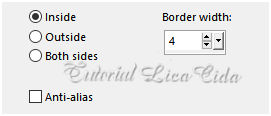
6_.
Layers → New Raster Layer.
Pinte com o gradiente Corel_06_017 (Metal Brass, anexado no material).
Configure: Style: Linear — Angle: 0 — Repeats: 0 — Invert desmarcado.
7_.
Effects → 3D Effects → Inner Bevel.
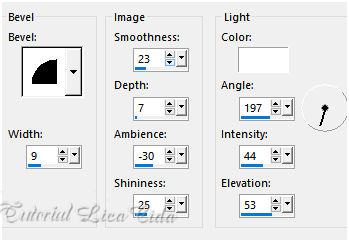
Selections → Select None.
Layers → Merge → Merge Down.
8_.
Plugin MuRa's Meister → Perspective Tiling — Height: 20 (demais valores Default).
Com a ferramenta Magic Wand — Feather: 60, clique na parte transparente e pressione a tecla Delete (quatro ou cinco vezes, para suavizar o efeito).
Selections → Select None.
Plugin MuRa's Seamless → Emboss at Alpha — Default.
9_.
Layers → New Raster Layer (Raster 3).
Selections → Load/Save Selection → Load Selection From Disk → circulocentrallc.
10_.
Selections → Modify → Feather: 20.
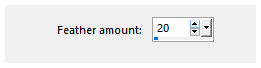
11_.
Plugin Alien Skin Eye Candy 5: Impact → Glass — Settings: flowers.
Effects → 3D Effects → Drop Shadow: 2 / 10 / 80 / 10,00 — Color: #000000.
Repita com valores negativos: -2 / -10.
12_.
Layers → New Raster Layer.
Edit → Copy no misted 2136-luzcristina
Edit → Paste Into Selection.
Selections → Select None.
Adjust → Sharpness → Sharpen More.
Layers → Merge → Merge Down.
13_.
Ative a Copy of Raster 2.
Layers → Duplicate.
Image → Rotate Right.
Plugin MuRa's Meister → Pole Transform.
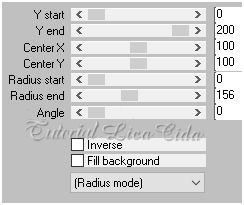
Layers → Duplicate.
Image → Mirror → Mirror Horizontal.
Layers → Merge → Merge Down.
Layers → Duplicate.
Image → Mirror → Mirror Vertical.
Layers → Merge → Merge Down.
Image → Rotate Left.
Effects → 3D Effects → Drop Shadow: 2 / 10 / 80 / 10,00 — Color: #000000.
Repita com valores negativos: -2 / -10.
14_.
Volte à Copy of Raster 2.
Edit → Copy no decoraster4
Edit → Paste As New Layer.
15_.
Ative a Raster 2.
Plugin Nik Software → Color Efex Pro 3.0 → Bi-Color User Defined — Default.
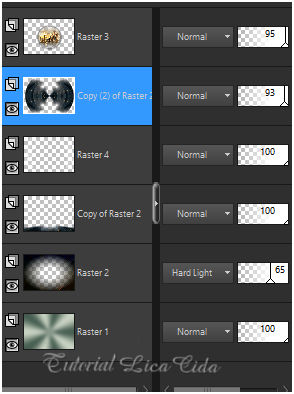
Blend Mode: Hard Light — Opacity: 65%.
Altere os Blend Modes e a Opacity das layers a gosto.
16_.
Image → Add Borders: 1 px, Symmetric marcado — Color: #445c4f (Background).
Edit → Copy.
17_.
Image → Add Borders: 40 px, Symmetric marcado — Color: #ffffff.
Com a ferramenta Magic Wand (Default), selecione a borda.
18_.
Edit → Paste Into Selection (a imagem copiada).
Adjust → Blur → Gaussian Blur — Radius: 38,00.
19_.
Effects → Texture Effects → Weave (print do item 3).
Plugin Graphics Plus → Cross Shadow — Default.
Selections → Invert.
Effects → 3D Effects → Drop Shadow: 0 / 0 / 80 / 40,00 — Color: #000000.
Selections → Select None.
20_.
Plugin AAA Frames → Foto Frame — Width: 20 (demais valores Default).
Repita.
21_.
Edit → Copy no tube SuizaBella_Ref_AG-00906
Edit → Paste As New Layer.
Image → Resize: 80% e depois 90% — Resize all layers desmarcado.
Posicione e use a gosto.
Adjust → Sharpness → Sharpen.
Opcional: Adjust → One Step Photo Fix.
22_.
Image → Add Borders: 1 px, Symmetric marcado — Color: #445c4f (Background).
Image → Resize: Width 1000 px.
Aplique a marca-d'água.
Assine e salve.
Espero que gostem.
Aparecida / LicaCida, maio de 2020.
Rio de Janeiro - Brasil.

VOLTAR
Copyright ©2026 - Web Design - Naise Minas
|


