|
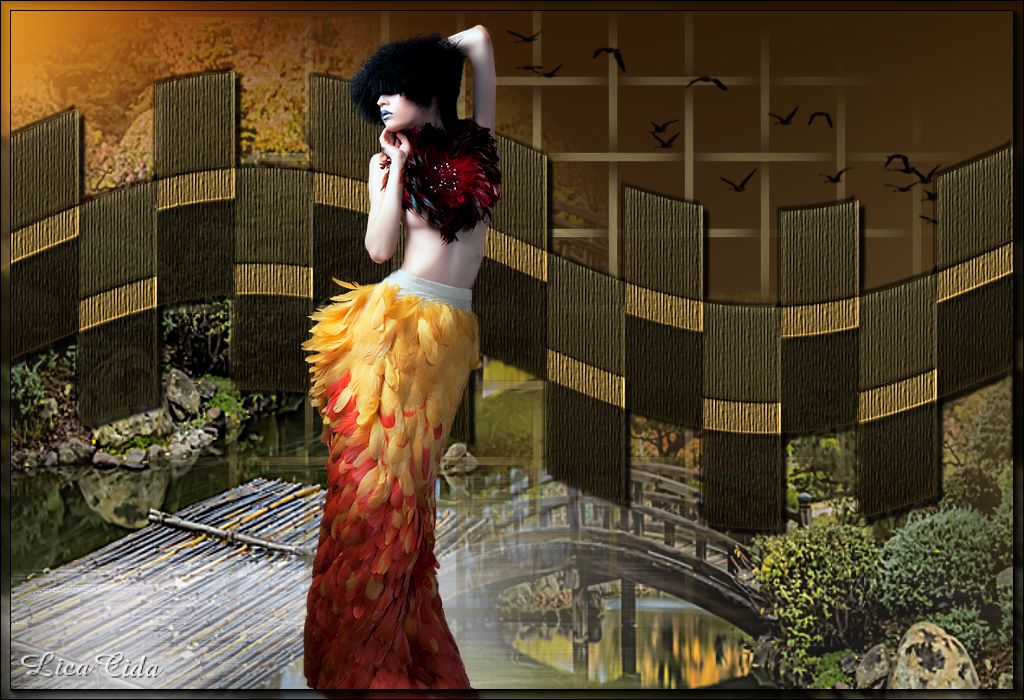
Variação History
DESAFIO
Desafio proposto: Top History.
Tutorial de Mara Pontes com variações de LicaCida (variações em preto).
MATERIAL

Seleção: history
Mask: Narah_mask_0471
Textura: 8SUIZA
Imagem: cloud
Presets: Preset_Lights_history
Preset_CloneBrush_clonehistory
Script: flood
Marca-d'água.
Efeitos do PSP.
Tutorial de Mara Pontes com variações de LicaCida.

PLUGINS
Plugin dsb flux → Linear Transmission
Plugin Alien Skin Eye Candy 5: Textures → Weave
Plugin FM Tile Tools → Blend Emboss
TUTORIAL

|
Esta seta marca sua linha
Clique e arraste para movê-la
|
|
1_.
Abra uma nova imagem transparente de 1024 x 600 px.
Selections → Load/Save Selection → Load Selection From Disk: history.
Pinte com um gradiente Linear, com cores a seu gosto (cores usadas: #654a1b e #d0cc9d — Invert desmarcado).
Selections → Select None.
2_.
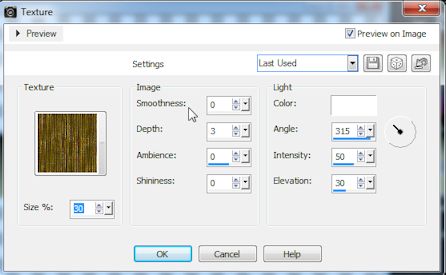
Effects → Texture Effects → Texture (configure como no print).
3_.
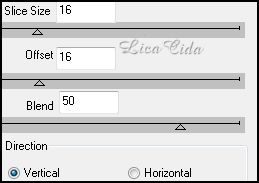
Plugin dsb flux → Linear Transmission.
4_.
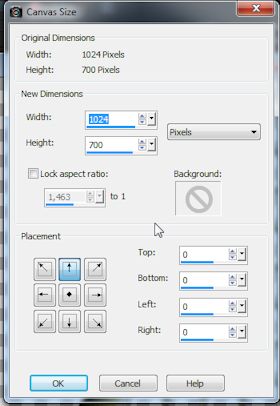
Image → Canvas Size: 1024 x 700 — Placement: Top.
5_.
Effects → Geometric Effects → Wave.
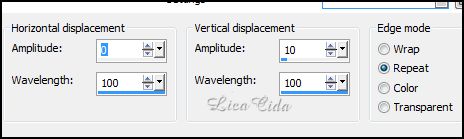
6_.
Layers → New Raster Layer.
Layers → Arrange → Send to Bottom.
Pinte com o mesmo gradiente do item 1.
7_.
Plugin Alien Skin Eye Candy 5: Textures → Weave.
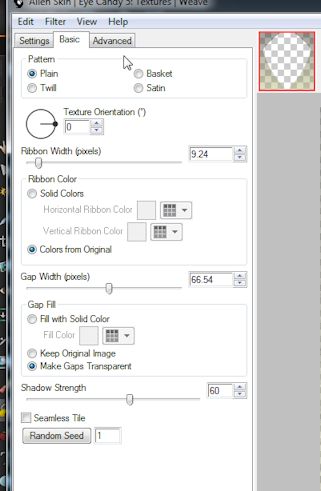
8_.
Layers → New Mask Layer → From Image: Narah_mask_0471.
Layers → Merge → Merge Group.
9_.
Layers → New Raster Layer.
Layers → Arrange → Send to Bottom.
Selections → Select All.
Edit → Copy na imagem cloud
Edit → Paste Into Selection.
Selections → Select None.
10_.
Layers → Duplicate.
Na layer duplicada, mude o Blend Mode para Multiply.
Layers → Merge → Merge Down.
11_.
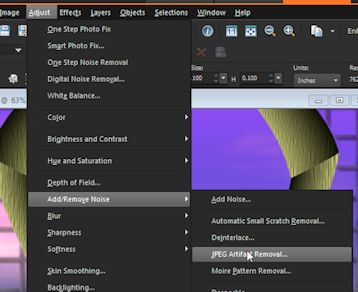
Adjust → Add/Remove Noise → JPEG Artifact Removal.
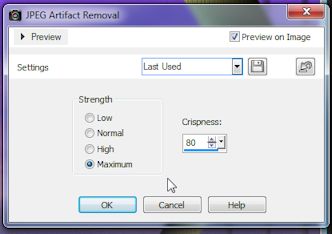
12_.
Plugin FM Tile Tools → Blend Emboss.
13_.
Effects → Illumination Effects → Lights → Preset: Preset_Lights_history.
14_.
Layers → New Raster Layer.
Rode o script flood.
OBSERVAÇÃO
Só use o script flood se você usar alguma paisagem que contenha água.
15_.
Edit → Copy no tube da paisagem
Edit → Paste As New Layer.
Posicione a gosto.
16_.
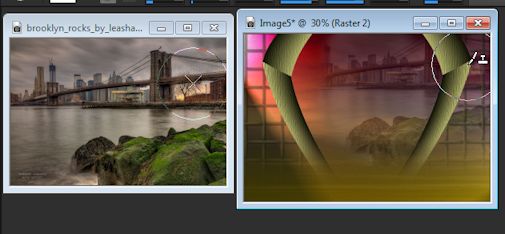
Layers → New Raster Layer, acima da layer do script flood.
Configure a ferramenta Clone Brush (preset Preset_CloneBrush_clonehistory) e aplique parte da paisagem. Veja como:
17_.
Layers → New Raster Layer.
Layers → Arrange → Send to Bottom.
Pinte com o mesmo gradiente, com Invert marcado.
Repita o item 13.
Adjust → Blur → Gaussian Blur — Radius: 90.
Aplique também na layer superior, a Raster 2.
18_.
Effects → 3D Effects → Drop Shadow.
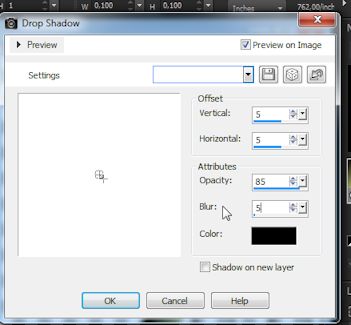
Use somente na layer do efeito principal e também no negativo.
Effects → User Defined Filter → Emboss_3.
LAYERS
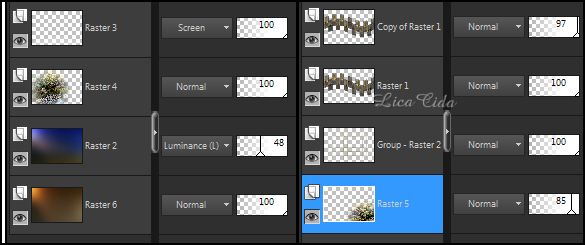
Faça o acabamento a gosto.
Aplique a marca-d'água.
Assine e salve.
Tutorial de Mara Pontes, com variações de Aparecida / LicaCida.
Rio de Janeiro - Brasil.

VOLTAR
Copyright ©2026 - Web Design - Naise Minas
|