|
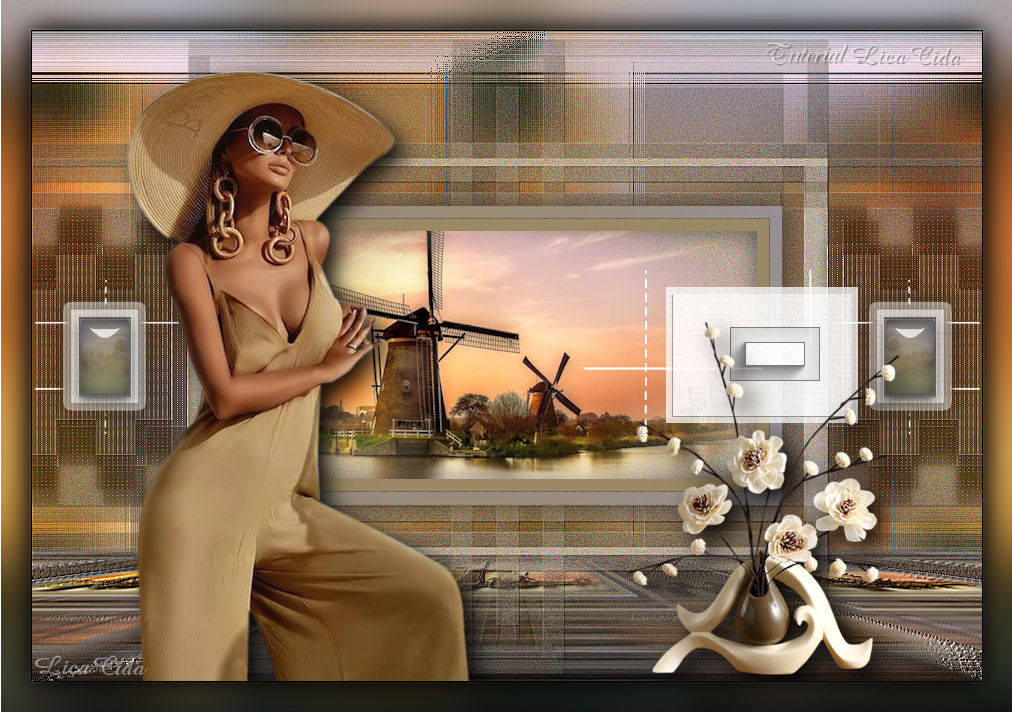
Windmills
TRADUÇÕES

MATERIAL

Preset: harmony — do Eye Candy 5: Impact → Glass.
Dê um duplo clique sobre o preset para importá-lo ao plugin.
Masks: maszk_1 (darei os créditos se souber a autoria)
Narah_Mask_0951
Tubes: 3245 - woman - LB TUBES
SvB Molens 1 misted
SvB Bruine vaas met beige bloemen
Deco: deco
decor_nmcriacoes_99
Marca-d'água.
Efeitos do PSP.
Versão usada: PSP X9.
PLUGINS
Plugin FanHouse → Loom
Plugin MuRa's Meister → Perspective Tiling
Plugin Alien Skin Eye Candy 5: Impact → Glass
Plugin Alien Skin Eye Candy 5: Impact → Perspective Shadow
TUTORIAL
|
Esta seta marca sua linha
Clique e arraste para movê-la
|
|
1_.
Abra uma nova imagem de 950 x 650 px.
Pinte com a cor #96919c (use no Foreground).
Cores retiradas da Raster 2 do tube 3245 - woman - LB TUBES.
2_.
Selections → Select All.
Edit → Copy no tube 3245 - woman - LB TUBES
Edit → Paste Into Selection.
Selections → Select None.
Effects → Image Effects → Seamless Tiling — Default.
Adjust → Blur → Gaussian Blur — Radius: 32,00.
3_.
Effects → 3D Effects → Buttonize.
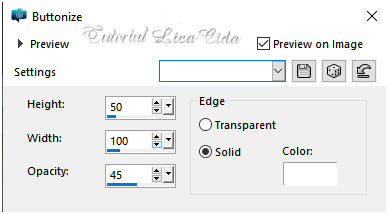
Repita, mudando os valores:
Effects → 3D Effects → Buttonize.
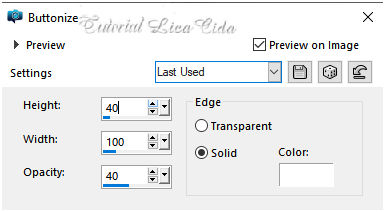
Effects → Image Effects → Seamless Tiling — Side by side.
Effects → Edge Effects → Enhance More.
4_.
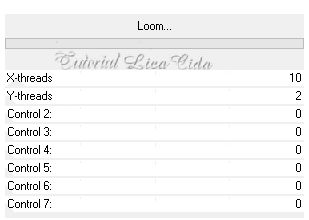
Plugin FanHouse → Loom.
5_.
Layers → New Raster Layer.
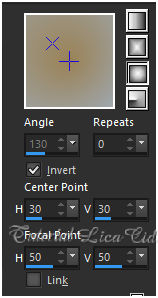
Pinte com o gradiente formado pela cor usada no Foreground e a cor #9b8864 (use no Background).
Configure: Style: Sunburst — Repeats: 0 — Invert marcado — Center Point: H: 30 / V: 30 — Focal Point: H: 50 / V: 50.
6_.
Layers → New Mask Layer → From Image: maszk_1.
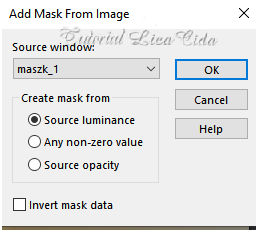
Layers → Merge → Merge Group.
Effects → 3D Effects → Drop Shadow: 1 / 1 / 100 / 1,00 — Color: #000000.
7_.
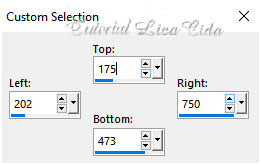
Ative a ferramenta Selection Tool (tecla S) → Custom Selection.
8_.
Layers → New Raster Layer.
Pinte com o gradiente formado no item 5.
Selections → Modify → Contract: 12 px.
Pressione Delete.
9_.
Selections → Modify → Contract: 1 px.
Pinte com a cor do Background: #9b8864.
10_.
Selections → Modify → Contract: 12 px.
Pressione Delete.
Selections → Select None.
Effects → 3D Effects → Drop Shadow: 0 / 0 / 58 / 37,00 — Color: #000000.
11_.
Edit → Copy no SvB Molens 1 misted
Edit → Paste As New Layer.
Dê o resize necessário (aqui, 90%) e posicione.
Selecione o quadro, use Selections → Invert e pressione Delete para apagar as sobras.
Selections → Select None.
Layers → Merge → Merge Down.
Adjust → Sharpness → Sharpen.
12_.
Ative a Raster 1.
Layers → New Raster Layer.
Pinte com o gradiente formado no item 5.
Layers → New Mask Layer → From Image: Narah_Mask_0951.
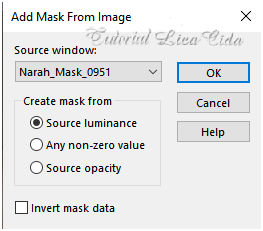
Layers → Merge → Merge Group.
Effects → Reflection Effects → Rotating Mirror: 0 / 180 — Reflect.
Effects → 3D Effects → Drop Shadow: 1 / 1 / 100 / 1,00 — Color: #000000.
Blend Mode: Multiply.
13_.
Volte à Raster 1.
Edit → Copy Special → Copy Merged.
Edit → Paste As New Layer.
14_.
Plugin MuRa's Meister → Perspective Tiling — Height: 20 (demais valores Default).
Effects → User Defined Filter → Emboss_3.
Retire a visibilidade da layer superior (Group-Raster 3).
15_.
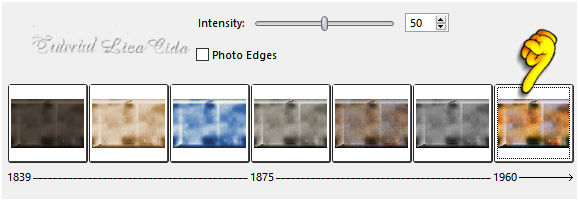
Ative a Raster 1.
Effects → Photo Effects → Time Machine.
16_.
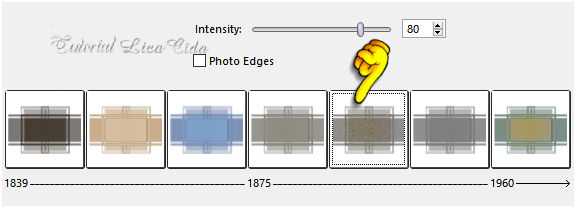
Ative a Group-Raster 2.
Effects → Photo Effects → Time Machine.
17_.
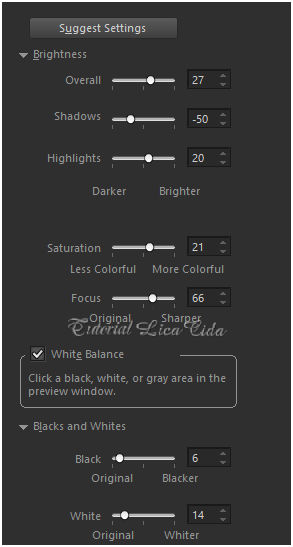
Na mesma layer:
Adjust → Smart Photo Fix.
18_.
Edit → Copy no deco (Raster 4)
Edit → Paste As New Layer.
Layers → Arrange → Bring to Top.
Altere os Blend Modes e a Opacity das layers (use a gosto).
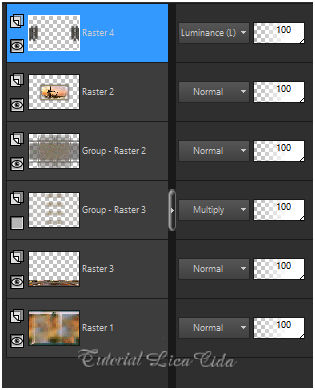
Delete a layer cuja visibilidade foi retirada (Group-Raster 3).
19_.
Ative a layer superior (Raster 4).
Edit → Copy no decor_nmcriacoes_99 (Raster 4)
Edit → Paste As New Layer.
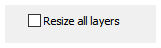
Image → Resize: 80% — Resize all layers desmarcado.
20_.
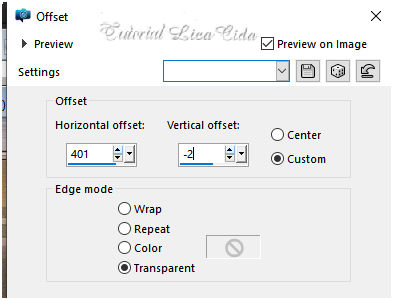
Effects → Image Effects → Offset.
21_.
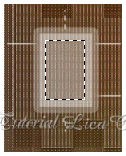
Selecione o decor como no print.
Layers → New Raster Layer.
Pinte com o gradiente formado no item 5.
22_.
Plugin Alien Skin Eye Candy 5: Impact → Glass — Settings: harmony.
23_.
Effects → 3D Effects → Chisel — Color: #000000.
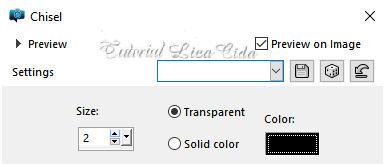
Selections → Select None.
Effects → 3D Effects → Drop Shadow: 0 / 0 / 58 / 37,00 — Color: #000000.
Layers → Merge → Merge Down.
Effects → Reflection Effects → Rotating Mirror: 0 / 0 — Reflect.
24_.
Edit → Copy no decor_nmcriacoes_99 (Raster 5)
Edit → Paste As New Layer.
Image → Mirror → Mirror Horizontal.
25_.
Effects → Image Effects → Offset.
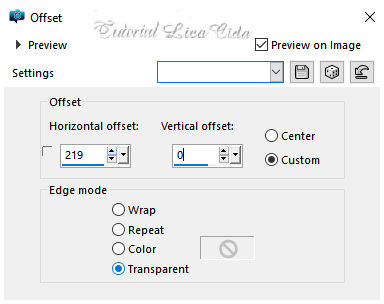
Duplique os decors e dê Merge.
26_.
Edit → Copy no tube 3245 - woman - LB TUBES
Edit → Paste As New Layer.
Image → Resize: 90% — Resize all layers desmarcado.
Posicione.
Plugin Alien Skin Eye Candy 5: Impact → Perspective Shadow — Blurry.
27_.
Edit → Copy no SvB Bruine vaas met beige bloemen
Edit → Paste As New Layer.
Dê o resize a gosto e posicione.
28_.
Ative a Raster 1 e use Edit → Copy.
Image → Add Borders: 1 px — Color: #000000.
Image → Add Borders: 30 px — Color: #ffffff.
Selecione a borda.
Edit → Paste Into Selection.
Adjust → Blur → Gaussian Blur — Radius: 32,00.
Selections → Invert.
Effects → 3D Effects → Drop Shadow: 0 / 0 / 80 / 40,00 — Color: #000000.
Selections → Select None.
Aplique a marca-d'água.
Assine e salve.
Espero que gostem.
Obrigada!
Aparecida / LicaCida, setembro de 2020.
Rio de Janeiro - Brasil.


VOLTAR
Copyright ©2026 - Web Design - Naise Minas
|


